


Latest Version: 3.00
Added on: 2015/05/26
I have always wanted to try something new in my theme development. This time, I bring to you a grunge design. In my previous post, I listed an article about grunge effect tutorials. I kind of like the idea of having stains, dirty textures, rips and torn images to enhance the look of a blog.
I am proud to partner with the owner of Smashingapps.com and grant him the rights to distribute the theme exclusively on the site. For the support of this theme, please leave your issues in the comment section of this post.

By using this theme for FREE, you agree to accept the external links.





The following is an example of a custom design of the Grunge Style theme.
 |

|
 Main Features
– User-friendly Options page
– Drop-Down Menu
– Automatic Thumbnails
– Different design for sticky post feature
– Compatible with IE7, IE8, Firefox, Chrome, Safari, Opera
– W3C XHTML and CSS compliant
– SEO ready
– Gravatar enable
If you wish to translate this theme into your own language, you can do so with the use of the Poedit program. To find out how this works, please refer to this comprehensive guide.
When you have completed the localization, kindly send me the translated files so I can share your work (with your credit) with other users.
Automatic Thumbnails
Please refer to this page for the details of how the automatic thumbnails work.
Drop-down Menu
The Grunge Style theme has a multi-level drop-down menu that is using the latest function in WP 3.0. There are two ways to create the drop-down menu.
1) When you create hierarchical pages, the drop-down menu will show up automatically in the header navigation.
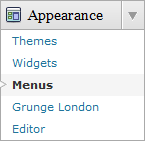
2) You can manually define the header links using the custom menu. To do it, first, click on the “Menus” link found under the “Appearance” tab in WP admin. Then follow the instruction on the page to add your custom menu. This feature only works with WP 3+.

Plugin
There is a featured content section below the header link. This feature is built in using the Featured Content Gallery (FCG) plugin. Please download the latest version and follow the instruction found in “Readme.txt” to do the setup.
If you do not want to show this feature, just don’t install the plugin.
Blog Title and Description
The demo is showing a special font as below:

By default, after you install the theme, the blog title and description are showing the Arial font.

You can change the font style by following this instruction:
Part 1: Modifying Font Style
– Download this PSD zip file (also included the font that I use)
– Extract and open the PSD file in the Photoshop/ImageReady/Gimp/PaintShop program
– Change the title and description using your desired font (you are free to modify the header image if you want)
– Save the image using this name: bg_header.jpg
– Upload the image to your server in the “/styles/default/” folder
Part 2: Activating the Style
– Login to your WP admin
– Go to the options page of the Grunge Style theme under “Appearance -> Grunge Style”
– Find “Theme Style” under “Layout Setting”
– In the pull-down menu, select “default.css”
– Save the setting and go to your site to see the changes.
Ad Widget
An ad widget can be found under the “Available Widgets” section. You can drag the widget to the sidebar. This widget allows you to add your advertisement while keeping the sidebar design. Please limit the width of your ad to 160px.
User Showcase
The followings are a few examples of nice modification of this theme from other users. You can view all the nice design in the forum theme showcase.
 |
 |
 |
Change log
2009-07-03 v1.00 – Release
2010-10-26 v3.00 – New – Added drop-down menu, ad-widget, Options page, advanced automatic thumbnails, custom style, custom menu (works on WP 3+ onwards) and enabled localization (translation).
22 Comments
Trackbacks/Pingbacks
- thewordpresscafe.com - A Look at TemplateLite for your WordPress Themes... Brian, at TemplateLite not only has themes that look good (his…
- Best Free Premium-Like WordPress Themes Collection. Best for Bloggers, | guidesigner.net - [...] the idea of having stains, dirty textures, rips and torn images to enhance the look of a blog.…
- 7 nouveaux themes wordpress gratuits de haute qualité - Mastersblog - [...] Télécharger | Démonstration [...]
- Sélection de 16 thèmes Wordpress fraichement sortis | Le Journal du Blog - [...] Grunge Style - Free Wordpress Theme | Theme Details | View [...]
- 16 High Quality Free WordPress Themes Released in June-July 2009 | BlogingBloging - [...] Grunge Style – Free Wordpress Theme | Theme Details | View [...]
- 15+ High Quality Free WordPress Themes Released in June-July 2009 | Graphic of the World - [...] Grunge Style – Free Wordpress Theme | Theme Details | View [...]
- Ücretsiz Wordpress Temaları … - R7C.Net Herşey Mevcut - [...] Grunge Style | Tema Detayı | Ön İzleme Grunge [...]
- Mas de 30 Wordpress themes gratuitos « Tutoriales y Recursos - [...] Grunge Style Wordpress Theme | Theme Details | View [...]
- 20+ güzel wordpress teması indir | pc-aras - [...] Grunge Style | Tema Detayı | Ön İzleme Grunge [...]
- The Top 7 Free Premium-Like WordPress Themes Released in July - WPCrowd - [...] the idea of having stains, dirty textures, rips and torn images to enhance the look of a blog.…
- 天道 » Blog Archive » 2009年7月最受喜爱的7个 WordPress 免费主题 - [...] 下载 | 浏览 [...]
Leave a Reply


Nice looking theme 🙂
But i have two notes
the color of the fonts not suitable with the site background i hardly see the words
wish you can change it to white or more viable color
I feel it is quite ok. If you want to change to different color, simply edit the font color under the “body section” in style.css 🙂
What are the color codes that can be used to edit the font color, please? Also, how can I change the css style sheet to reflect different fonts and sizes for the post text? Thank you very much. I really like the theme.
@Kelly Truelove, you can modify style.css, find .entry (around line 294). This is the section for post entry.
Change the color:#877D66; to your color choice
You can also change the font family and size by adding the 2 lines below
font-size: 12px;
font-family: Verdana, Arial, Helvetica, Sans-Serif;
Other sections are configured in the similar way. Yes, some css knowledge is needed.
Been waiting for this for weeks! LOVE THIS.
hehe, great! Thanks Brian!
I’ll try this theme soon:-)
nice themes..
i really like it..
i hope that i can have it in blogger version…
A great theme!
I’m now trying it on http://mactrix.net, replacing the previous techie theme. I guess I can use it permanently.
Mea culpa… sort of. The grunge folder had the wrong permissions.
Now that I have the grunge style working (and I really like the way it looks), I’m puzzled by the headings in the second sidebar. Instead of the label being rounded at the right as it is on the left, it’s squared off and extends beyond the sidebar background. I see this at the demo site, too, so I guess it’s for a good reason that eludes me.
It is created that way to give you the impression that the label is slided into the sidebar slot 🙂
OK, thanks, now I get it!
Thanks for using my theme 😀
I Love the Grunge Them, it looks great and goes quiet well with my blog, thanks for sharing the theme and I will spread the word.
I tweeted this already@
New Website theme for Richard’s Scriptures! http://bit.ly/vBrYK Thanks to @templatelite for his Grunge Style theme http://bit.ly/HmWI6
Thanks again, Richard
http://www.twitter.com/Bitlockers
Love the theme and have loaded it on a friend’s site. Coyote Moon
I would like to know if it is possible to change the size of the avatar in the post replies. If yes, point me to the correct page, and I’ll figure out the rest.
Thanks,
~Dale
@Dale, please post your questions in the forum and I’ll address it there. Thanks.
Hi Brian,
I absolutely love this theme but I would like to make three modifications if you an somehow help me. I only know basic HTML and nothing of PHP or CSS so please make it for a total foreigner dummie…
1 – How do I KILL that search function that comes by default? I don’t like search at all.
2 – How do I KILL that feed symbol? I don’t need that either.
3 – How do I make the notebook styled image no-scroll? The images are nice, who needs scrolling!
Thanks!!
@Angel, please post your issues in the Grunge Style theme support forum and I’ll address them there.
Thanks! Since ou didn’t give me any specifics, I’m posting on the Grunge Style General Info :))
great.. I LOVE IT
Hello there,
Working with this template and was wondering how I can edit the css file so that on short pages the image and background go all the way to the bottom of the browser. I have been toying with using a background image ( don’t like it ) I have been toying with height and min-height options, but that only does the background image and not the template to the bottom ( unless I am doing it wrong).
Hoping you can help me out on a few things here.. Would really like to use and modify this template, but this is holding me back. I have surfed the web and seen a few ideas, but it is not working for me.
Last resort I figured I would bother the developers and see if they can give me some snippets of code to achieve this effect.
Kind regards,
Saxamo
@Saxamo, you can post your issue in the forum and see if anyone can help you over there. Since this is a custom work, a small fee may incur.