


Latest Version: 1.00
Added on: 2015/06/17
During the time when I started to layout this theme, I am kind of running out of ideas. I was struggling to make something that would give you the “wow” feelings. Though it is not as appealing as I expect, it took me longer to create this theme than my most beautiful themes during when I was full of inspiration.
Ideas.. ideas.. ideas… I need more great ideas!

By using this theme for FREE, you agree to accept the external links.




 Main Features
– Different design for sticky post feature
– Compatible with IE7, IE8, Firefox, Chrome, Safari, Opera
– W3C XHTML and CSS compliant
– SEO ready
– Gravatar enable
Blog Title and Description
The demo is showing a special font as below:

By default, after you install the theme, the blog title and description are showing the Arial font.

You can change the font style by following this instruction:
– Download this PSD zip file (also include the font that I use that is available free from fontstock.net.)
– Extract and open the PSD file in the Photoshop program
– Add the title and description using your desired font
– Save the image using this name: bg_header_new.jpg
– Upload the image to your server in the /images folder
User Showcase
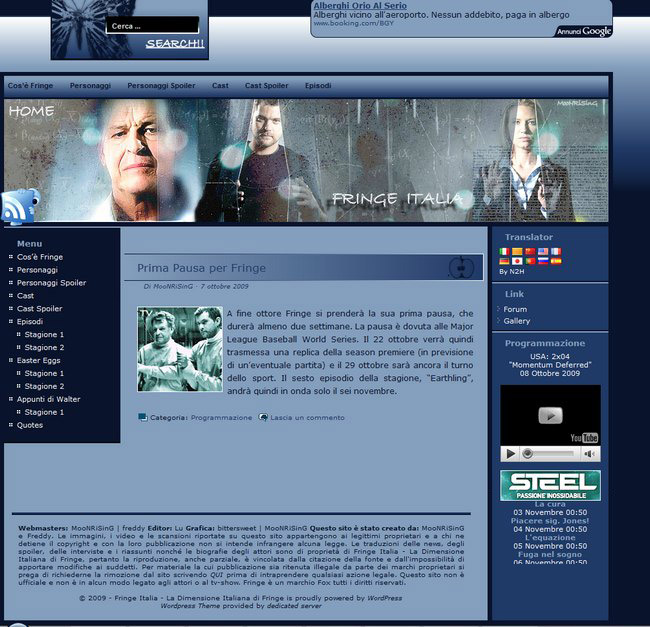
The followings are a few examples of nice modification of this theme from other users. You can view all the nice design in the forum theme showcase.
 |
 |
 |
Change log
2009-06-17 v1.00 – Release
2009-07-14 – Theme is compatible with WP 2.8
26 Comments
Trackbacks/Pingbacks
- 两款不错的WordPress主题 » One PC, One PPC, One Life - [...] 主题官方地址:Heavenly Blue [...]
Leave a Reply


Awesome Work Added to my Directory
i am having error
Fatal error: Call to undefined function post_class() in /home/glk616/public_html/aliengang.com/wp-content/themes/heavenly-blue/index.php on line 25
wat to do with it plz reply to my email address
Hi, you are using WordPress 2.6.3, which doesn’t support the post_class() function . My themes only work on WP 2.7+.
Hi..very cool theme. Love it.
Is the image of the ‘lady’ at the header changeable?
Thanks for giving this template for free….
Hi, the lady image is changeable using a PSD file. If you do not want to purchase the PSD file just to change the lady image, I can change it for you at a small fee.
great work! how about something inspired from this http://osc.template-help.com/wordpress_24316/ for the next theme? I think it will be perfect, you`re a great artist!
Thanks for sharing this beautiful theme. Maybe the magazine-style theme is something that I could try on 🙂
Excellent is an understatement for your themes. I have a social network where I have added all your themes. I was wondering if you could make a Donkey -Grass themed design. I know it’s a little weird request, just in case you want to consider. 🙂
Thanks for adding my themes to your social network. I appreciate it.
Thanks for your suggestion too. I’ll consider your proposal.
I may need the lady image to be changed, would you please let me know how much will it cost? You have got my email address so you can reply, or you can post here. Thanks, and i must say, your themes are among the best of freely available themes at the internet.
I will change the lady image with your own one depending on the nature of your image. Please send me your image to wpsubmit @ templatelite.com and I’ll review if it is suitable.
Once accepted, I’ll let you know and you’ll need to donate $10 via the donation link and I’ll get it done for you.
Thank you for this is a great info and good luck for your bright future .
good job keep it up
Hey brian any news about upcoming theme
regards
Hey. I just released my new theme, Grunge Style 😀
i become this error pls help me 🙂
Fatal error: Call to undefined function: get_header() in /www/htdocs/w005cec4/heavenly-blue/index.php on line 1
Hi, get_header() is WordPress built-in function, which will include the header.php. Please switch to other theme to see if the same problem occurs or not. If not, please upload Heavenly Blue again.
Hi Bryan,
I downloaded your Heavenly Blue theme (through a third party). I have modified the header, but I would like to modify the third column (the right side column) to contain ads. Is there a straightforward way to do that? FYI, I am kind of a noob with WordPress. Also, I’m happy to donate to this site if that what it takes.
Thanks,
MJD
You can add a text widget into right sidebar and insert the ad code. Simply go to Appearance -> Widgets, then select “Text” and add your ad code.
Brian,
That worked nicely, thank you. However, once the text is entered, I see no way to cause it to be a live link. Is there one? Also, is there a way to insert (hopefully linkable) JPEG graphics into this space?
Thanks, MJD
Yes. Just use normal html code to link the text and images.
Eg.
<a href=”YOUR-URL”>Text</a>
<a href=”YOUR-URL”><img src=”IMAGE-URL”></a>
Brian,
Thanks again. But this did not seem to work for me. I pasted your code into (following) the text in the text widget. I replaced YOUR URL with an actual URL, but in viewing the page, no links are visible. It makes me think I have put this code in the wrong place… but what is the right place?
– MJD
Hi Brian,
I am writing from a different email address (because it is the one I used to make a donation today), but it’s the same Michael Davis from the last few comments. As I said earlier, using your HTML suggestions did not function correctly for me, so I am hoping that you might be able to offer more assistance.
There is a possibility that I am simply misunderstanding the HTML syntax. But all I want to do is load a number of small graphics in the 3rd column and have them link to our Sponsors’ websites.
Thanks in advance for any help you can spare.
– MJD
@Davis, sorry for the late reply.
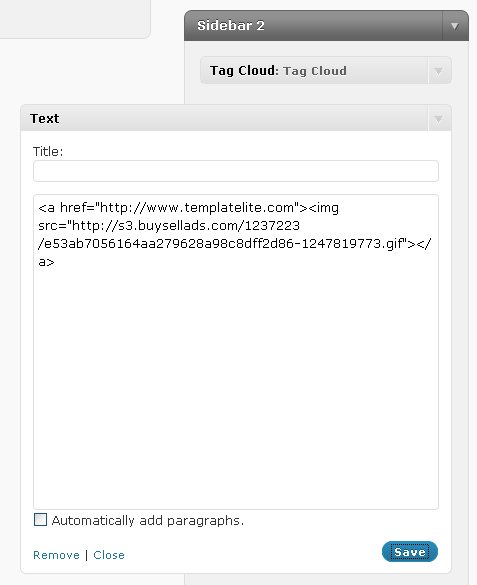
I think you miss one step that I didn’t specify. You need to drag the “Text” widget to “Sidebar2” before you can enter you image. Please refer to the following image for details:
Brian, (8/27/09)
I had (previously) created the Text Widget, so that’s not the problem.
Here is the exact text I am using in the Widget – perhaps you can spot the error? If I test the URL, the graphic is certainly there. So I can’t understand why it won’t link in the Sidebar.
HTML Code:
Many thanks for any advice you can offer…
@Michael, in order for the html code to show up in the comment, you need to input the code differently. Eg, replace the “” with “>”
Anyway, please send the html code to my email at wpsubmit @ templatelite . com for me to take a look.
Thanks Brian, I will try this and take it from there.