


Latest Version: 2.00
Added on: 2015/05/24
Here comes the Note Paper theme with the feature content section below the header.

By using this theme for FREE, you agree to accept the external links.


 Main Features
– User-friendly Options page
– Drop-Down Menu
– Automatic Thumbnails
– Different design for sticky post feature
– Compatible with IE7, IE8, Firefox, Chrome, Safari, Opera
– W3C XHTML and CSS compliant
– SEO ready
– Gravatar enable
Automatic Thumbnails
Please refer to this page for the details of how the automatic thumbnails work.
Drop-down Menu
The Note Paper theme has a multi-level drop-down menu. The drop-down menu will show up automatically in the header navigation when you create hierarchical pages.
This is another feature that will be added to all my future themes.
Plugin
There is a featured content section below the header link. This feature is built in using the Featured Content Gallery (FCG) plugin. Please download the latest version and follow the instruction found in “Readme.txt” to do the setup.
If you do not want to show this feature, just don’t activate the plugin.
Blog Title and Description
The demo is showing a special font as below:

By default, after you install the theme, the blog title and description are showing the Times New Roman font.
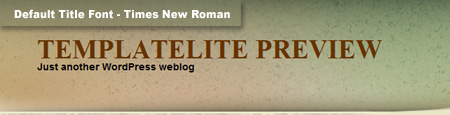
You can change the font style by following this instruction:
Part 1: Modifying Font Style
– Download this PSD zip file (also include the font that I use.)
– Extract and open the PSD file in the Photoshop/ImageReady/Gimp/PaintShop program
– Change the title and description using your desired font (you are free to modify the header image if you want)
– Save the image using this name: bg_header.jpg
– Upload the image to your server in the “/styles/default/” folder
Part 2: Activating the Style
– Login to your WP admin
– Go to the options page of the Note Paper theme under “Appearance -> Note Paper”
– Find “Theme Style” under “Layout Setting”
– In the pull-down menu, select “default.css”
– Save the setting and go to your site to see the changes.
Ad Widget
An ad widget can be found under the “Available Widgets” section. You can drag the widget to Sidebar 1. This widget allows you to add your advertisement while keeping the sidebar design. Please limit the width of your ad to 250px.
User Showcase
The followings are a few examples of nice modification of this theme from other users. You can view all the nice design in the forum theme showcase.
 |
Change log
2009-11-24 v1.00 – Released
2010-06-10 v2.00 – Added drop-down menu, ad-widget, Options page that includes Twitter and feed integration, advanced automatic thumbnails, custom style and more.
19 Comments
Leave a Reply


I have converted this theme to blogger.
http://www.bloggergallery.com/2009/11/note-paper-blogger-templates.html
May we know how to customize it to just have 1 column sidebar only?
That will be wonderful If the theme have such option.
@BigELK176, a big coding change is required to customize to 1 column sidebar and I am sorry that I do not have the resources to do it now.
Using this now even though I just bought the PSD files of the Paper Craft theme. All your themes are just so lovely. 😀
Oh yeah, what font did you use for the RSS?
Thanks!
@Bored & Crafty, thanks for the support of my themes. The RSS text in this theme is custom made and it doesn’t belong to any font.
Please advise how to setup “twitter follow me” link into this theme.
Ignore it. I just found the options in WP admin. OK!
I love your themes and am disappointed I can no longer use them because photoshop is required to change the heading. I don’t own or know how to use photoshop… so for every new Template lite theme I want to use, I have to bother someone to change it for me. This simply compels me to go elsewhere, where the themes pick up the title of the blog and tagline from the WP files and aren’t hard coded. Shame, I love this theme and am frustrated that I can’t change it on my own.
@Curvy Jones, I kept the default font structure like any other free themes in the market. If you are not using the Photoshop to edit the font, the blog title and tag will be showing the Times New Roman font and the info is picked up from the “Setting -> General” section in the WP admin.
It is only when you want to change the header text to other special font, then you need to modify it in Photoshop.
Thanks, I tried to install and looked everywhere to change it. I finally asked a friend with Photoshop to change it and it looks great at http://www.thesweetescape.net.
I tried to install this — but I think I did something wrong as it keeps saying “templatelite” at the top of my page rather than defaulting to the times new roman font.
I would love to use this… I just won’t put it live until it works.
Thanks.
@Julie, I uploaded this header file, bg_header_new.jpg which is not supposed to be in the /images folder.
Please re-download and use the updated theme file and the header title will be showing the default value.
Thanks for pointing this out. I appreciate it.
AWESOME THEME! Would love to follow you on Twitter or check out your other stuff! Thanks!
When I enable page to have comments function, but NOT work.
I found some info guild me to edit the page,php.
Move the line:
just before the line:
….then it works! Great!
Cheers!
Move the line: [?php endwhile; endif; ?]
just before the line: [?php comments_template(); ?]
I have downloaded the theme but it will not activate, I get the following error message:
Parse error: syntax error, unexpected T_STRING, expecting T_OLD_FUNCTION or T_FUNCTION or T_VAR or ‘}’ in /home2/ampittsb/public_html/madpeanut/dawn/wp-content/themes/note-paper/functions/option.php on line 5
@Dawn, please post your issue in the Note Paper forum to get free support.
Can I remove text from footer ?
@zele, you can remove the footer links by purchasing the ad-free version of this theme.