


Latest Version: 3.00
Updated on: 2015/05/02
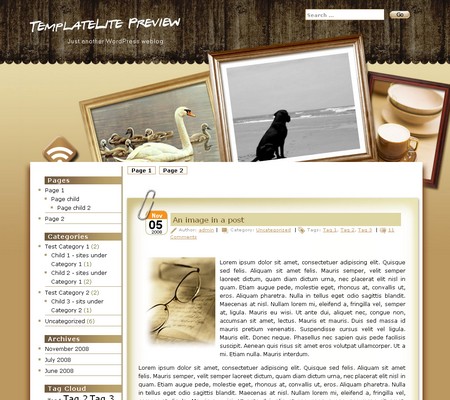
Nicely designed Photo Frame theme. You can replace the picture in the middle frame with the photo of your choice.
By using this theme for FREE, you agree to accept the external links.




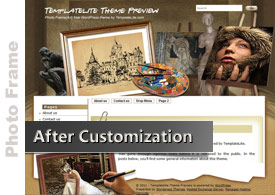
The following is an example of a custom design of the Photo Frame theme.
 |
|
 Main Features
– User-friendly Options page
– Custom menu
– Automatic Thumbnails
– Different design for sticky post feature
– Compatible with IE7, IE8, Firefox, Chrome, Safari, Opera
– W3C XHTML and CSS compliant
– SEO ready
– Gravatar enable
Blog Title and Description
The demo is showing a special font as below:

By default, after you install the theme, the blog title and description are showing the Time News Roman font.

You can change the font style by following this instruction:
Part 1: Modifying Font Style
– Download this PSD zip file (also include the font that I use)
– Extract and open the PSD file in the Photoshop/ImageReady/Gimp/PaintShop program
– Change the title and description using your desired font (you are free to modify the header image if you want)
– Save the image using this name: bg_header.jpg
– Upload the image to your server in the “/styles/music/” folder
Part 2: Activating the Style
– Login to your WP admin
– Go to the options page of the Photo Frame theme under “Appearance -> Photo Frame”
– Find “Theme Style” under “Layout Setting”
– In the pull-down menu, select “default.css”
– Save the setting and go to your site to see the changes.
User Showcase
The followings are a few examples of nice modification of this theme from other users. You can view all the nice design in the forum theme showcase.
 |
 |
Change log
2008-09-11 V1.00 – Release
2008-10-07 V1.04 – Based on all your feedback, we have changed a lot of things in this theme 😀
2008-10-21 V1.05 – Remove one line in CSS to fix Firefox compatibility issue
2008-11-03 V1.06 – Minor changes. No need to upgrade to this version if you don’t encounter any issues with ver 1.05
2008-12-20 V1.10 – Comment section support paging and threading (WordPress 2.7 feature)
– Exclude the pages in menu if you set it in widgets.
2009-07-14 – Theme is compatible with WP 2.8
2011-05-16 v3.00 – New – Added drop-down menu, ad-widget, Options page, advanced automatic thumbnails, custom style, custom menu (works on WP 3+ onwards) and enabled localization (translation).
105 Comments
Trackbacks/Pingbacks
- Free Scrapbook Style Wordpress Themes | Graphic Design Free Resources - [...] 10. Photo Frame from Template Lite [...]
- Free Scrapbook Style Wordpress Themes | Downrex - [...] 10. Photo Frame from Template Lite [...]
- Gail at Large » Blog Archive » A Change Would Do You Good - [...] template was free and I had to buy the PSD files to make major revisions. The original template is…
Leave a Reply


Steven, to add a “Home” link, follow this step:
edit header.php, find
<ul><?php echo wp_list_pages(‘echo=0&sort_column=menu_order&depth=1&title_li=’); ?></ul>
change to
<ul><li><a href="http://yourhome.com">Home</a></li><?php echo wp_list_pages(‘echo=0&sort_column=menu_order&depth=1&title_li=’); ?></ul>
Thanks!
I’m looking forward to image rotation in all three photo frames — any idea on an ETA for 1.07? Great theme, thanks!
Brian, Steve,
Perhaps this code is better, since it uses the values set by the administrator of the site in the dashboard:
  <ul>

				<li><a href="<?php echo get_settings('home'); ?>/"><?php _e('Home'); ?></a></li>

                                    <?php wp_list_pages('depth=1&title_li=0&sort_column=menu_order'); ?>

  </ul>
~Andrew~
I just installed this theme and love it! All seems to be working well for me. I’ve also used your maple leaf theme. You really do a terrific job with the themes. Thanks for sharing them!
Thanks for the nice theme I use it for my 3d Anaglyph Photography weblog
Hello I would like to use this template to my blog but I do not know how to install
I am using blogger.
Some body can help me please?
This theme is stunning! One of the best I’ve found for wordpress. I’ve been trying to create drop-down menus (which I’m thrilled are on your to-do list) and have had no success. Even using the WP Multi-level Navigation plug-in fails due to the dropdown subpages appearing under the container. I don’t know enough css to fix.
Can I get informed when the next version is released?
Thanks greatly for your sharing.
Hi, the next version will be released soon 🙂
Hi again, I tried using the “add a link to the menu” strategy listed above, to add an additional link after the menu, and it won’t appear (even though it is oddly there when I look at the source code). Very odd. Does anyone have a suggestion?
Thanks!
Hi, me again.
When I conduct a search, I am given a list of posts. They are shorter forms of the full posts (which is fine). However, the links within those posts are not activated. Is this a wordpress issue or template specific? If it is the template, can I change this easily?
Thanks,
Keith
Hi,
This is an issue pertaining to WordPress platform.
There appears not to be any ability to leave comments for ‘pages’, even though ‘enable comments’ is ticked in the edit page screen.
~Andrew~
Andrew, the following comments will help you get the page comment set up:
http://www.templatelite.com/green-light-free-wordpress-theme/ (look for comment #25 and #59)
http://www.templatelite.com/maple-leaf-free-wordpress-theme/ (look for comment #71)
Hello. And Bye. 🙂
You rock. World needs more souls like you.
Hi,
How would I use this theme for my google blog?..Can you help me out please.
Thanks,
Naveen
You can refer to the brief installation guide at http://www.templatelite.com/installation-guide/
Hi
Great themes, but I miss the opportunity of localization.
There are problems with Firefox… the post title cannot be clicked… and the post page will not display properly, the post sometimes shown below the sidebar
By the way, I noticed all your design does not have a link to Home Page. Or is there anyway the homepage can be displayed that I am not aware of?
Overall, great theme.
Hi, please confirm you are using the latest theme version. The current version is 1.10. If the post is shown below the sidebar, you should check to see if you have incomplete div block in your sidebar.
I can’t do further checking since you didn’t provide the url.
Actually all my themes have got home page link in the header (either the blogger title or the whole header).
Hi Brian,
First of all congratulations for this theme is awesome.
I tried to move the side bar but seems that this didn’t moved completely, because I still see a brown vertical line, this is more easy to see in every refreshment of my blog, this error makes “ugly” my blog , I tried severeal times to fixed bout I don’t know how, could you please help me?
in advance thanx a lot!
Hi Elsa, you need to modify container_topbg.jpg, bg_repeat.jpg and footer_bg.jpg to clear the vertical line.
Thanks for the beautiful theme. My question is, my rss feed is not working. What may be the reason?
Can you show me your URL?
Thanks for the reply, My url is like following
http://www.xyz.com/?feed=rss2
Can you show me the URL in which you install the theme? I still don’t understand what you mean.
Maybe you can try something like http://ww.xyz.com/feed/
Compatible WP 2.8.4 ???
the font that is included in dose not support persian and by the way it is very nice template and if for persian language set to the tahoma font it is more better
Hi
This isn’t really a support question so I hope it’s okay to put it here.
I’ve been using this wonderful theme for a while now for a client who runs a pet cemetery business but I’m thinking of recommending a new one for her for two reasons:
1. Not sure this is being updated to keep pace with WP
2. I really need to have drop down menus at the top for this project as her site has developed so much it’s now too difficult to navigate.
Can you tell me if there is going to be any changes made to this theme any time soon?
Cheers and thanks for providing such fabulous themes for people!
@Jacki,
1. This theme has been tested to work on WP 3.0
2. I’ll add drop down menu to all the older themes and I’ll make a point to work on this theme first. I am currently busy with other stuff and the theme upgrading plan will only start months later.
Nah that’s not good! As I said earlier, I’ve been using this theme for a client for over a year but I am fiddling with the clients site on a mock-up so I downloaded the theme again today. All of a sudden you have added advertising for a bunch of hosting providers and other irrelevant people to the code that shows up in the footer and the meta. That is just plain rude. I don’t want to advertise some random businesses on my clients site. I am happy to credit you – and I always have – but that sneaky advertising just stinks. At the very least you should be up front and tell people you’re using their sites as advertising fodder if they use your templates.
Sorry – I wont be using your themes anymore if this is deliberate – and I cant see how it isn’t. Disgusted.
@Jacki, I am sorry this has caused trouble to your client. However, I need the advertisers to sponsor my themes so that I can continue to develop new themes and upgrading the old ones.
If you want to remove the advertisers’ links, I do provide an option for you to purchase the ad-free package. I don’t see what I am doing is disgusting at all, do you?
That template is simple AWESOME.
I’m making a site for my 4 month old son with pictures and stuff to share with family.
I have two questions:
1.Site name is wrong coding, I can’t make polish letter display correctly.
2.Is there any chance to remove:
Web Hosting Refer
Domain Whois – BeeWhois
from meta?
Regards
Bartek
@Bartek, kindly post your issues in the support forum and I’ll address it there.