


Latest Version: 3.00
Updated on: 2015/05/24
Presenting to you the Watercolor theme, this time, I created a theme with different design style.
Colorful as it is, this theme uses a lot of free style and smudging techniques, thus giving you the watercolor painting look that is so different from other themes you have seen.
Hope you’ll like my latest creation 🙂

By using this theme for FREE, you agree to accept the external links.


The following is an example of a custom design of the Watercolor theme.
 |

|
 Main Features
– User-friendly Options page
– Drop-Down Menu
– Automatic Thumbnails
– Different design for sticky post feature
– Compatible with IE7, IE8, Firefox, Chrome, Safari, Opera
– W3C XHTML and CSS compliant
– SEO ready
– Gravatar enable
This is my first theme that allows localization. If you wish to translate this theme into your own language, you can do so with the use of the Poedit program. To find out how this works, please refer to this comprehensive guide.
When you have completed the localization, kindly send me the translated files so I can share your work (with your credit) with other users.
Automatic Thumbnails
Please refer to this page for the details of how the automatic thumbnails work.
Drop-down Menu
The Watercolor theme has a multi-level drop-down menu that is using the latest function in WP 3.0. There are two ways to create the drop-down menu.
1) When you create hierarchical pages, the drop-down menu will show up automatically in the header navigation.
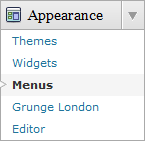
2) You can manually define the header links using the custom menu. To do it, first, click on the “Menus” link found under the “Appearance” tab in WP admin. Then follow the instruction on the page to add your custom menu. This feature only works with WP 3+.

Plugin
Watercolor theme uses two plugins, FlickrRSS and FCG.
1) FlickRSS plugin
There is a photo gallery where you can display up to 5 photos in the footer. For instruction on how to install the plugin, please refer to FlickrRSS.
If you don’t install this plugin, it will not cause error to the theme. Instead, you will only see blank photo frame.
2) Featured Content Gallery Plugin
There is a featured content section below the header link. This feature is built in using the Featured Content Gallery (FCG) plugin. Please download the latest version and follow the instruction found in “Readme.txt” to do the setup.
If you do not want to show this feature, just don’t install the plugin.
Blog Title and Description
The demo is showing a special font as below:

By default, after you install the theme, the blog title and description are showing the Arial font.

You can change the font style by following this instruction:
Part 1: Modifying Font Style
– Download this PSD zip file (also included the font that I use)
– Extract and open the PSD file in the Photoshop/ImageReady/Gimp/PaintShop program
– Change the title and description using your desired font (you are free to modify the header image if you want)
– Save the image using this name: bg_header.jpg
– Upload the image to your server in the “/styles/default/” folder
Part 2: Activating the Style
– Login to your WP admin
– Go to the options page of the Watercolor theme under “Appearance -> WaterColor”
– Find “Theme Style” under “Layout Setting”
– In the pull-down menu, select “default.css”
– Save the setting and go to your site to see the changes.
Ad Widget
An ad widget can be found under the “Available Widgets” section. You can drag the widget to Sidebar 1. This widget allows you to add your advertisement while keeping the sidebar design. Please limit the width of your ad to 160px.
User Showcase
The followings are a few examples of nice modification of this theme from other users. You can view all the nice design in the forum theme showcase.
 |
 |
 |
Change log
2009-03-04 v1.00 – Release
2009-05-11 v1.01 – Modify the javascript to fix the height of dynamic content, move javascript to seperate .js file
2009-05-11 v1.02 – Fix IE problem (only change style.css)
2009-07-14 – Theme is compatible with WP 2.8
2009-08-21 v1.03 – Fix: Show pagination on single.php
2010-05-15 v1.04 – Fix: Static page problem
2010-05-24 v2.00 – New: Added drop-down menu, ad-widget, Options page that includes Twitter and feed integration, advanced automatic thumbnails, custom style and more.
2010-08-24 v3.00 – New: Added custom header menu (works on WP 3+ onwards) and enabled localization (translation).
82 Comments
Trackbacks/Pingbacks
- WaterColor WordPress Theme | Themelicious - [...] WaterColor Theme is a well-designed template that is suitable for WordPress users desiring a unique theme, released [...]
- Water Color - Nouice – Free wordpress themes & reviews - [...] Download the theme here [...]
- 20 Great Textural WordPress Themes @ Templature - [...] release | demo | download Leave a comment [...]
- 100 The Very Best of Free WordPress Themes - WPCrowd - [...] thus giving you the watercolor painting look that is so different from other themes you have seen. Download &…
- Links #25 Amilo Gewinnspiel, Social Icons, Wordpress Theme, Google, Twitter, Drupal ect. | NETZ-ONLINE - [...] Bei templatelite.com gibt es ein schönes 2 Spalten Wordpress Theme kostenlos zum Download. [...]
- 28种漂亮的WordPress免费风格 « 皇家元林 | Seven’s Blog - [...] Demo Download [...]
- themesbuzz.com - Watercolor Theme Wordpress Templatelite... Colorful as it is, this theme uses a lot of free style and smudging techniques,…
Leave a Reply


just awsome!! if somebody could turn this to blogspot…:(
My official converter, Falconhive.com has just converted this theme to blogspot. Check it out!
Hi from Munich,
I d like to have a blogg and i choose the wordpress.com, so i found this template – watercolor- but i can not optimise it. I dont understand how i can connect it with the wordpress.
Could u pls help me if its possible for u?
Thnx in advance
My themes only work on WordPress.org instead of WordPress.com. You need your own domain and a host in the first place before you can install WordPress.org and my themes.
LOVE it! I’ve been waiting for something different to use on my blog. This theme is perfect. Thanks for designing it!
thaaaanks!:x:x
It took me just one evening to implement your template, create my site pages, and paste in my content.
You are a very talented designer.
Thanks so much. My site looks wonderful.
Thanks for this really beautiful theme, I love it!
Bummer, I have to keep listing your theme on CMSTheme.NET 😀
Another great theme!
http://www.cmstheme.net/theme/wordpress/watercolor.html
Which font are you using for the header on the demo?
The font is Anke Calligraphic FG, which you can download free from http://www.dafont.com/anke-calligraphic-f.font
Wonderful template! If only you could turn it to Opera 🙁 Anyway, you’re a very good designer. 😀
Tried to use but got an error message for line 26 of index.php. Any suggestions as to how to fix or what the problem is?
Thanks.
Wakar
thanks for the amazing theme 😉 I wish I could create a good one someday 😉
What happened to the tag cloud?
The tag cloud is working fine in the demo. Could you be more specified about your issue?
Hi, I love this template…..very beautiful! On mine, I can’t get rid of two remarks that are to the left of the purple date tags …it just says “Undefined” instead of the month and date for the purple tabs. How do I fix this? Thank you!
Cher
Hi, as specified on http://www.templatelite.com/for-blogger-blogspot-template-users/, I don’t provide support for the Blogger template. Bloggerstyles.com will.
Hey Cher, if you go to “http://www.bloggerstyles.com/watercolor-blogger-template/” it will show you how to set up the date. 🙂
I think it is a nice theme. I am in the process of setting up a site with this theme but have a small problem. I can not see google ads in the sidebar when viewing live with IE. It is fine in Firefox. I have tried adding the code in a text widget and directly in sidebar.php and both ways I can not see the ads when viewing in IE.
Please send me your blog’s URL so I’ll go take a look.
I’m having some trouble with the theme in IE6. The posts layout doesn’t seem to display correctly .. the posts go outside the post layout. Looks fabulous in FF and I haven’t modified any codes or styles. Any clues on how correct this? In case it’s user error, I’m inserting a screen capture link to display what I’m seeing..
http://i99.photobucket.com/albums/l300/befuzled/RS%20ALbum/IE6watercolors.jpg
Please clear the cache and try.
Are you using the Blogger template? I think that the Blogger version of this template doesn’t work on IE6. You have to check with Bloggerstyles to find out more.
Nopes.. Its wordpress. Here’s my site: http://www.rambivilous.com/ (I shoulda posted that for you in the first place) The only thing I’ve done is put in widgets to the side bar… Grr IE drives me batty
Hi Patti, your feedback has helped me find out the bug of my theme. Thanks!
I have changed the style.css (just one file) to fix the IE6 problem and revise to 1.02.
Hi, I love the watercolor theme but cannot get it to work. I get a fatal error that says Fatal error: Call to undefined function post_class()” in “/watercolor/index.php on line 26”.
I’ve tried removing all the widgets before installing but that has not made any difference. I checked the code on the W3C site and it said it looked like something wasn’t closed. I couldn’t find what that was (only having very little knowledge of this). Do you think you could help? I tried downloading the one here on your site in case it would work but still no luck. I put in the URL above if you want to see for yourself.
Again, I’d love to use this theme if you can let me know how to get it working. Thank you.
Wakar
I see that your blog runs on WordPress 2.5.1 but my themes work on ver 2.7+
Please upgrade your WordPress and install the theme. If you have problem installing, please let me know again.
Thanks, I love your creation. I’m currently using this on Blogspot. Falconhive.com converted it perfectly.
Could you share installation manuals for this theme for livejournal?
Thank you in advance!!
Are you saying to convert this theme to Livejournal? If so, I am sorry that I have no plan for that. For the installation guide, you can find it at http://www.templatelite.com/installation-guide/
Gorgeous! As soon as I get my hosting I’ll come back and get it!
Thank you so much for your themes! I’m thrilled with Watercolor, but I’m having one small issue. The date tabs on the left are not appearing. I haven’t changed anything on the template except to remove the category listing at the end of each post. The dates have been missing since I installed it.
Any ideas on where to look?
I have WP 2.7.1
Thank you!
hi there…
Thanks so much for sharing this layout.. i totally love it.. However, i’m facing a problem with the menu bar.. may i know if it’s possible for me to add more than 4 icons at the menu bar.. Hope to hear from you soon.. Thanks again
Due to the design limitation, the number of header menu is limited to 4. I am sorry that there is nothing much I can do.
oh i see… Actually im using this template in blogspot but i have this problem where the words always go out of margin… Could you please help me with it ?? My website is
http://soldout-shopaholicepitomist.blogspot.com/
Thanks a lot 🙂
I am sorry that I don’t provide Blogspot related issues as specified on http://www.templatelite.com/for-blogger-blogspot-template-users/
Thank you so much for this template! I love it!
Great work! Keep it up!
Thank you for this theme Brian. I love it! Keep up the great work! I hope to someday be able to make something as nice as this for WordPress. Thanks for sharing!
Hi Fantastic theme liked it so much now using it for my website/blog and it works a dream. Hoping to be able to convert it for sohoadmin and b2evolution … if that is ok with you of course … will be sure to credit you for the initial design on each of these. Lovely job, well done.
All the best
Midge
Sure Midge, you can convert to sohoadmin and b2evolution if you like. Thanks!
I like it so much.. I will post it as a good blog template 🙂
Hi Brian!
First av all, I looove this theme! All of your themes, actually. No more looking the web around for themes, you only need this site. 🙂
But I have two questions:
I use to have the Meta-widget with links to admin-login, support, rss etc. But it seems to disapeard. Is it a problem solved in the theme or do I have to look somwhere else?
There is no archive.php-file in the theme? Do I solve it by writing my own or by a plugin? Or do I’ve missed something?
Maybe this is not something you support? In that case, could you give me a hint where I should seek the answer?
Keep up your good work, I could only dream of being that talent.
Thanks for all the lovely themes!
// Linda
@Lorei, the Meta widget should work, please check “Available widget” in the widget page.
As for the archive code, I merge it into index.php. You can edit the code in index.php or take the code and save it as archive.php.
Hope this helps 🙂
I love this theme! Thank you so much for sharing your talent! I love all the themes .. and am trying to figure out how to use them all in different blogs. HAHA otherwise I am going to keep changing my theme monthly. LOL
I have gotten 2 fatal errors so far.
First is when I use the search box. I get the following:
Fatal error: Call to undefined function semantic_entries() in /home/grtweb9/public_html/grtblog/wp-content/themes/watercolor/search.php on line 22
Second is when I click on one of the tag cloud links. I get the following:
Fatal error: Call to undefined function semantic_entries() in /home/grtweb9/public_html/grtblog/wp-content/themes/watercolor/tag.php on line 19
also what are the increment font sized for the Tags in the tag cloud? I would like to shring the large font down a little so it isn’t quite so big and that is only at 2 tags.
thanks for all your help! And I cannot wait to see the new themes you share!
Kimberly
@Kimberly, my themes don’t have that function semantic_entries(). Maybe this is some plugins problem. You can try to switch the theme to the default one and try to search and click on the tag again. That functions seem to be created by wpframework..
If you are facing the same problem on the default theme, then you should check which plugin is causing the problem.
To change the tag font size for the tag widget is quite troublesome and I still don’t have a good solution yet.
thanks for the info. however, the search.php is part of your files to upload, regardless. checking with wpframework fixed the problem … you need to change the semantic_entries() to post_class() — easy fix. however, I get a new error:
Fatal error: Call to undefined function framework_get_terms() in /home/XXXXXX/public_html/XXXXXX/wp-content/themes/watercolor/search.php on line 46
and there is nothing I can find on framework_get_terms() at wpframework site. considering that you validate everything and it’s up to date, adding outdated files to upload with your package defeats the purpose.
when I switch back to the default and add the search widget, it works perfect. As much as I love and adore this template, I cannot afford to have fatal errors come up on my blog as I am using it try to boost sales at my website.
I like the tag cloud feature as well, so I am looking forward to seeing what you come up with!
You really do awesome work. Thanks for working so hard and sharing with all of us.
by the way, are the files all the same in every template you offer? I don’t have time to check other templates right now to see if the search box or tag cloud work without errors. but if they all have the same search.php, it might be something you may want to check.
thanks again.
Kimberly
@Kimberly, I am quite curious. Until now, none my themes have search.php. I also don’t use wpframework to build my themes.
Did you download the theme from my site? 😯
I did upload the template files directly from your site. I am in the process of uploading several other templates to check. I have a friend that also uploaded the watercolor template to her blog and also has the exact same errors I did with both the search box and tag cloud. I have not had time to fix her blog yet, as she is in the decision process of what templates to change to, if at all.
Neither one of us wants to switch, as we both love your templates. So I am taking some time today to do some research on some of your other templates. I can let you know which ones I upload and if they work or not.
thanks
Kimberly
Hey Brian,
I got rid of all the templates in my WP other than the default. Then I uploaded a fresh copy from here then FTP’d to my blog. The search button works perfect and the file that caused issues is gone! Woot! Off to do that same for the other blog!
thanks for having such amazing templates! I may even use the Grunge style! Love it!!!
Kimberly
@Kimberly, glad to see you have solved the problem 🙂
The coding of my themes are clean so under normal circumstances, they should work well on any blogs.
I’m using this beautiful theme for my first blog, and I thank you for making it available.
I do have some questions about modification:
1. Can I adjust number of links that can be posted? More than four will not appear.
2. Can the FlickrRSS be modified for, perhaps, a privacy policy statement or AdSense? Any other use of the space would be appreciated.
3. Can you modify the layout to include a translation widget? Google’s simply does not work with this theme. In fact, no other widgets ‘work’ with this theme. I would really like to keep the sleek and stylish appearance of Watercolor.
Any help or suggestions would be appreciated. Thanks again for making this lovely theme available free of charge.
@Bobby Jean,
1. Due to the design, the number of links to be displayed in the top menu is limited to 4.
2. A lot of time is needed to modify the Flickr section. I am sorry that I don’t have the time to do it currently. 🙁
3. The translation widget works for WordPress. Seems like you are using the blogspot version of this theme. Please go to http://www.bloggerstyles.com to get help.
Lovely theme! I just paid $20 to remove the credit link
Wondering how long before I get instructions
Could you please send me a decrypted template.php in text file to my email?
I would like to edit way showing your credits and website information in Latvian, not in English. I’ll translate it.
Waiting for your email – Kaste
btw – Very nice theme 🙂
@Kaste, please send me the translated text and I’ll add it for you.
Still waiting for translated template.php !
Thanks for the great help today! Love the theme, but there’s one last thing that doesn’t seem to work – the flickr pics.
I’ve had flickrRss for a long time so it should work perfectly, but there’s no way that is displays more than one picture. I’ve tried changing the settings in flickrRss from user to sets – chaning number of pictures and to take different size pictures – but still – not more than one. I have not changed the number of pictures it should display – using the default 5.
Any hints?
– Anett –
@Anett, please post your issues in the Watercolor forum. I no longer provide support in the comment section.
Thank, nice theme.
Just a superb theme.. i love this theme. 😀 thank you
Hi
I love your design. Do you have a website version of this or do you think this download template could be customised?
Many thanks
Alex
@Alex, you need first install WordPress.org to use my themes.
HI Brian thanx for such a beautiful templete.
I m using this templete in my blog. Atcually facing some prob. how can I add navigate tabs (i.e Home, Sitemap, Contact) at the top in my blog.
My blogspot name is pyaridunia.blogspot.com
One more thing whenever I post smthin there are showin in left sidebar “Undedined-Undefined”. I want to show there date of post.
@Aryan, you are asking Blogger template related issue that is not supposed to be posted here. Please go to Bloggerstyles.com for support instead.
I was just wondering if it is possible to remove the Flikr section fromthe footer at all? Are there any back end Theme Options and if so, I take it there would be a place here to either switch on or off Flickr?
hello,
nice theme! am a newbie in installing new themes to wp. i already uploaded the theme to my wp folder with the latest wordpress release on my web host yet only plain color displays.
can you help pls…
thanks!
@earl, please go to the theme forum instead for support.
Just to let your potential customers over here know (as well as in the forum) that the theme can be used in Livejournal if you are willing to (1) purchase the PSD and (2) do some advanced customization work. I did it using the LiveJournal Component theme, taking the PSD and doing some modifications to the background, then adjusting the colors in the LJ theme to match up. It worked pretty well, if I may say so! http://donna-june.livejournal.com/
Thanks again Brian for an absolutely GORGEOUS theme and for the hard work you do in presenting it and the options to provide in “purchasing” it. Great stuff. I hope to find a theme here for a friend of mine who is building her website.
Thanks.
how can i control the sidebar? how can i disable it or edit it?
@alex, kindly go to the Watercolor forum and post your issue and I’ll address it there.
Thank you for providing this amazing theme for free.
I use it on my blog (You may see my website link).
H! I love water color theme,
Thanks a lot..
But i’m facing one issue,
that, i dont get FEATURED post’s slide show!
Wot wud b the problem?
Plz help.
Thanks
___nistuL
@nistul, please post your question in Watercolor forum and I’ll address it there.
Hi Brian,
This theme is so beautiful and really what I was looking for. Can’t wait to get home so that I can install it! I also downloaded the photoshop pages so if everything works well, I’ll send you a link to my new updated blog!
Compliments – you are very talented!
Thanks again!
Lisa
Hi, Brian!
Good day…By the way, I been using your water color template for a couple months however, I have problem since I started using it regarding with comments in comments form. pls. help me out in this corcern.
thanks!
@Sis’san, it seems like you are using the Blogspot version of this theme. I am sorry that I do not provide support for the blogger template related issues.
I love you 4 this one! 😀
How can edit Footer Links i wnt to make in on my own
For example
© 2010 – tea Shoop
Cloud Hosting
@Adnan, to edit/remove the footer links, you’ll have to purchase the ad-free version of this theme.
Just curious how to remove the encryption on the template.php. As my host says it’s a threat to the server and can be dangerous, can you please let me know how to fix this. Thank you very much.
I will post this in the forum as well.
@Emmie, to remove the encryption, you need to purchase the ad-free package of the theme at $20.
This template is perfect for my site, Neoclassical Hippie. Come visit and see how I embedded my logo. I love it!!!!!!!!!!!!!!! Thank you so much!!!!!!!!!!!!