


Latest Version: 3.01
Modified on: 2015/05/03
Talk about surfers paradise, there is no place that can beat Gold Coast, Australia. Surfing is one of the things that I must try. Before I do that, I’ll just put some of my imagination in this theme.
Important note: To avoid compatibility issues, please ensure you are using WP 3+ when you install the Beach Gold Coast theme.

By using this theme for FREE, you agree to accept the external links.


Main Features
– User-friendly Options page
– Custom Header Menu
– Automatic Thumbnails
– Different design for sticky post feature
– Compatible with IE7, IE8, Firefox, Chrome, Safari, Opera
– W3C XHTML and CSS compliant
– SEO ready
– Gravatar enable
Automatic Thumbnails
Please refer to this page for the details of how the automatic thumbnails work.
Drop-down Menu
The Beach Gold Coast theme has a multi-level drop-down menu. There are two ways to create the drop-down menu.
1) When you create hierarchical pages, the drop-down menu will show up automatically in the header navigation.
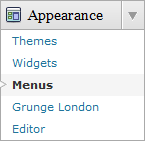
2) You can manually define the header links using the custom menu. To do it, first, click on the “Menus” link found under the “Appearance” tab in WP admin. Then follow the instruction on the page to add your custom menu. This feature only works with WP 3+.

This is another feature that will be added to all my future themes.
Plugin
There is a featured content section below the header link. This feature is built in using the Featured Content Gallery (FCG) plugin. Please download the latest version and follow the instruction found in “Readme.txt” to do the setup.
If you do not want to show this feature, just don’t install the plugin.
Blog Title and Description
The demo is showing a special font as below:

By default, after you install the theme, the blog title and description are showing the Arial font.

You can change the font style by following this instruction:
Part 1: Modifying Font Style
– Download this PSD zip file (also include the font for this theme)
– Extract and open the PSD file in the Photoshop/ImageReady/Gimp/PaintShop program
– Change the title and description using your desired font (you are free to modify the header image if you want)
– Save the image using this name: bg_header.jpg
– Upload the image to your server in the “/styles/default/” folder
Part 2: Activating the Style
– Login to your WP admin
– Go to the options page of the Beach Gold Coast theme under “Appearance -> Beach Gold Coast”
– Find “Theme Style” under “Layout Setting”
– In the pull-down menu, select “default.css”
– Save the setting and go to your site to see the changes.
Ad Widget
An ad widget can be found under the “Available Widgets” section. You can drag the widget to Sidebar 1. This widget allows you to add your advertisement while keeping the sidebar design. Please limit the width of your ad to 250px.

Change log
2010-09-07 v3.00 – Released
2014-04-03 v3.01 – Minor change.
2 Comments
Leave a Reply


Thank you so much for sharing this quality template.
If you ever check this, I figured this out. Thank you so much for such a great theme. Its too bad (for me, you must be busy) you can not accommodate any more work, I would love to use you in the future for some modifications. Thanks again.