


Latest Version: 3.01
Updated on: 2015/06/04
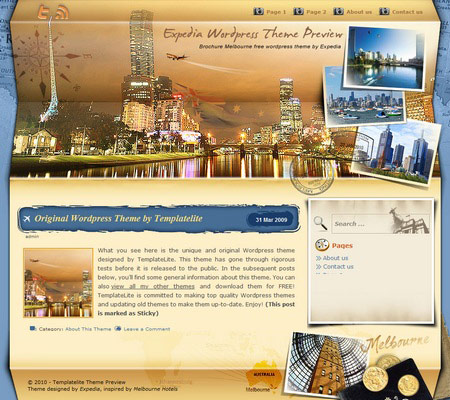
After the popular Postage Sydney theme developed for Expedia, the second Expedia theme uses the brochure concept. The folding element in the brochure gives the night scene of Melbourne an extra touch.
By using this theme for FREE, you agree to accept the external links.



Main Features
– User-friendly Options page
– Drop-Down Menu
– Automatic Thumbnails
– Different design for sticky post feature
– Compatible with IE7, IE8, Firefox, Chrome, Safari, Opera
– W3C XHTML and CSS compliant
– SEO ready
– Gravatar enable
Custom Photo Image
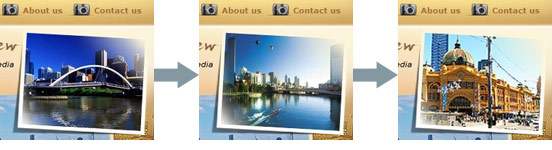
Upload your images to the “photos” folder with sizes of at least 180x145px and you’ll see the images appear in the first photo paper when the page is refreshed. More info about the feature can be found here.
The following shows the three rotating images of this theme:
Automatic Thumbnails
Please refer to this page for the details of how the automatic thumbnails work.
Drop-down Menu
 The Brochure Melbourne theme has a multi-level drop-down menu. The drop-down menu will show up automatically in the header navigation when you create hierarchical pages.
This is another feature that will be added to all my future themes.
Plugin
There is a featured content section below the header section. This feature is built in using the Featured Content Gallery (FCG) plugin. Please download the latest version and follow the instruction found in “Readme.txt” to do the setup.
If you do not want to show this feature, just don’t install the plugin.
Blog Title and Description
The demo is showing a special font as below:

By default, after you install the theme, the blog title and description are showing the Times New Roman font.

You can change the font style by following this instruction:
Part 1: Modifying Font Style
– Download this PSD zip file (also include the font for this theme)
– Extract and open the PSD file in the Photoshop/ImageReady/Gimp/PaintShop program
– Change the title and description using your desired font (you are free to modify the header image if you want)
– Save the image using this name: bg_header.jpg
– Upload the image to your server in the “/styles/default/” folder
Part 2: Activating the Style
– Login to your WP admin
– Go to the options page of the Brochure Melbourne theme under “Appearance -> Brochure Melbourne”
– Find “Theme Style” under “Layout Setting”
– In the pull-down menu, select “default.css”
– Save the setting and go to your site to see the changes.
Ad Widget
An ad widget can be found under the “Available Widgets” section. You can drag the widget to Sidebar 1. This widget allows you to add your advertisement while keeping the sidebar design. Please limit the width of your ad to 250px.

Change log
2010-05-08 v2.00 – Release
2010-06-07 v2.01 – Fixed RSS and Twitter link
2014-04-04 v3.01 – Minor change
10 Comments
Leave a Reply


Thanks you for sharing a nice themes.
mind blowing theme.. well the great thing is that it’s free………
Hey when you say this is an “Expedia template” what do you mean? does it mean that this template can be used with the expedia affiliate program? (ian.com).
If so, what would be the process to integrate the ian pages with the pages of the WP install? Expedia says that you need to upload header, sidebar and footer in html o htm files, how can i generate those out of the php that comes in the WP theme.
Any help with these is appreaciated
@Jose, the Expedia themes mean that the ownership of the themes belong to Expedia.
It is alright to use them with Ian affiliate program. You can use the Text widget to insert the affiliate code in the sidebar. To add the affiliate link to the footer, simply edit footer.php
Very big Thank’s, this theme very good for my site. Good Work !!!
Sorry my english, but in this theme buttons twitter and RSS need repleased, i push button Twitter and open RSS. Push button RSS go to Twitter 🙂 Thank’s
@Konstantin, thanks for pointing this out. I have fixed it and revised the theme to 2.01. Please download the updated version.
Thank’s for upgrade theme, may you do more 10 page’s in drop menu ? or How added more 10 page’s in drop menu ?
@Konstantin, kindly post your question in the Brochure Melbourne forum and I’ll address it there. Thanks.
I like it!! Good work!!