


Latest Version: 1.10
Updated on: 2015/06/19
Maple Leaf is a WordPress theme showing beautiful autumn season for personal blog.

By using this theme for FREE, you agree to accept the external links.




 Main Features
– Nice background. Best viewed with a resolution of 1280px. Viewed with 1600px resolution is also nice
– Support long header description (3 lines)
– Compatible with IE7, IE8, Firefox, Chrome, Safari, Opera
– W3C XHTML and CSS compliant
– Gravatar enable
User Showcase
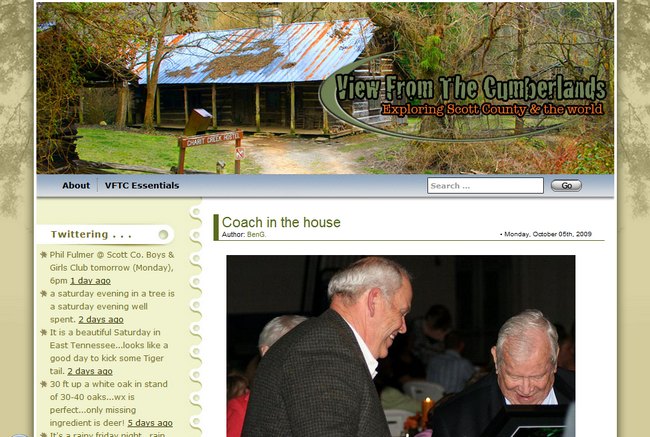
The followings are a few examples of nice modification of this theme from other users. You can view all the nice design in the forum theme showcase.
 |
 |
 |
Change log
2008-08-11 v1.00 – Release
2008-10-07 v1.03 – Fixed some compatibility issues.
2008-11-03 v1.04 – Minor changes. No need to upgrade to this version if you don’t encounter any issues with ver 1.03
2008-12-19 v1.10 – Comment section support paging and threading (WordPress 2.7 feature)
– Exclude the pages in menu if you set it in widgets.
2009-07-14 – Theme is compatible with WP 2.8
Upcoming change
- Add a drop-down menu in the header links.
- Add special font for the header title.
123 Comments
Leave a Reply


ah…… My father would love this one. L8R
This is quite possibly the easiest theme I have ever installed on my blog. There was almost NO work involved with getting all the stuff from my previous theme pulled over. Thank you very much. I LOVE it. Autumn is one of my favorite seasons.
Thanks for such a great theme, I use it on my work blog!
This template is beautiful- it really shows care and attention to detail, and it is lovely. Sadly, it does not work in the newest version of IE. Works great in FF and the new Google Chrome, but is all messed up in IE. Too bad, I love the look.
Erika, Maple Leaf has been tested on IE 7 and it works fine. Could you be more specific as to how it doesn’t work well?
Hi…
Where is the register button in the comment page?
Thank you
Tandy, the register link can be found under the Meta section in the left sidebar. However, you need to make sure that you got the setting right. In WordPress admin, go to Setting -> General -> Membership. Check on “Anyone can register”
Ref Erika she means internet Explorer 8 which should have launched in July this year. There’s a simple fix though to add to the header file to correct the rendering for IE8. Many people haven’t bothered to correct their sites and using IE8 all the time see the problems.
We have not tested in IE 8 yet because it is still in the Beta testing. When IE 8 is officially launched, we’ll begin to check all our themes in IE 8.
Love the template. Would it be difficult to add a “HOME” link to the nav bar? I’m trying to figure out how I could manually add it, but I’m not a coder. If someone is reading a post there’s no way they can easily go back to the “home” page.
Shane, it is easy to go back to “home page”, just click the blog title.
However, if you still want to add a “Home” in nav bar, you can edit header.php, find
<div id="menu">
<ul><? echo menu_separator(wp_list_pages('echo=0&sort_column=menu_order&depth=1&title_li=')); ?></ul>
and change it to:
<div id="menu"> <ul> <li><a title="Home" href="<?php echo get_option('home');?>">Home</a></li> <li class="separator"></li> <? echo menu_separator(wp_list_pages('echo=0&sort_column=menu_order&depth=1&title_li=')); ?></ul>Will this work in any theme or just this one?
@NOok, yes. This works in all my other themes.
When viewing blogs in IE6+ the blog entry only shows:
I’m not sure what to do about this. Could anyone help me out?
Thanks!
Hmm seems the comment doesn’t like the code. But it’s showing only endif. See my site in IE6+ and you’ll see the code that shows.
Paul, I checked your blog and found some unwanted code. It seems that you copied the text directly from MS Word program.
You can view source and find that many syntax is in Word format.
To remove those code, first, copy the content and paste it to notepad. Then copy the content in notepad and paste it to the post.
Please let me know if this problem persists after making this change.
Which version of WordPress is this Maple Leaf theme designed for? I currently have version 2.6 and it wont work at all.
Eugene, Maple Leaf is designed for WP 2.3+, including the latest 2.6.2. May I have your site’s URL for me to check in details?
A very attractive theme as other have duly noted. I used it to rebuild a deli website, however, there is one small problem I am hoping you can correct. The “Search” field doesn’t work. When I enter a search term, I get back too many unrelated (wrong) results. Since, I don’t write any code, I can’t fix this. In addition, your theme provides no way to remove this element if it’s really not needed or wanted.
In my situation, I would like the theme to provide the option to remove the search box so that more Page titles could be added.
I am testing with Firefox 3.0.2 on a Linux box running WordPress 2.6.2.
Keep up the excellent work.
Sorry if this is a duplicate post. I really like this theme and I’m using it. However, the “Search” function doesn’t work; it returns too many wrong results. Since I don’t code, I can’t fix or eliminate the “search” box.
Would it be possible for you explain how to fix the problem, or, at least, remove the Search box. I would recommend the option to remove the Search box be included in any future update of the theme.
Keep up the excellent work.
Thank you so much!
Lou Rizzo, the search box is fixed in the menu bar. We will provide an option to remove it in the next update.
I think I know why your search returns weird result. I found that you use table to arrange the excerpt for the search results. To correct this problem, please use notepad (or other text editors) to open index.php. Then find this code:
<div class="entry">
<? if (is_search()){
the_excerpt();
}else{
the_content('more...');
}
?>
</div>
and change them to
<div class="entry">
<? the_content('more...'); ?>
</div>
With this change, your search results will display like a normal post.
Paul,
Thank you very much for the code help. I hope I don’t screw it up, and I await the next update.
Paul,
I made the changes you recommended using the Word Press Theme Editor. The end result is that the search still does not work correctly, the results just look different.
I noticed that I’m unable to add the more tag. Also, the page height appears to be fixed, and I don’t want so much white space at the bottom. How do I make the page shorter? Thank you. Love this template.
Oh my god, my English is very bad…
But how can I remove the words and links “contact” “over mij” and “search”..
The words under the header…
I want to use this words and links in my sidebar…
Do you understand me??
I hope it’s possible, because i don’t like it when it stay there…
Adam, can you elaborate more about the more tag? I don’t quite understand what it means.
As for why this theme has a minimum height, it is because of the smooth background gradient. We need the minimum height to display the background nicely.
Sunlover, here’s how to remove the links “contact” and “over mij”.
1) open header.php
2) remove this line:
<ul><? echo menu_separator(wp_list_pages('echo=0&sort_column=menu_order&depth=1&title_li=')); ?></ul>To remove the search box, it is a bit complicated. (Lou Rizzo, here’s the tough way to remove the search box)
Firstly, open header.php and find this code:
<div class="search-field"><input type="text" value="Search ..." onfocus="if (this.value == 'Search ...') {this.value = '';}" onblur="if (this.value == '') {this.value = 'Search ...';}" name="s" id="s" /></div>change it to
Secondly, open this image: menu_bg.jpg
Remove search box graphic using image editing software.
I don’t see any code and line in youre text…
Sunlover, I have no problem viewing the text. Anyway, I just sent you an email with the details.
Using this theme within my WP v2.6.2 blog site and looks great.
However on IE6 I have to page down 2 pages b4 I c the first post!
the calender and categories display fine on the top left. check the site link above 2 c
Works fine in Opera, Firefox
Some other ?’s:
– what do I edit to change the top picture scenery and also the graphical leaf background image
– I have Tag Cloud as a plug-in but its not getting displayed. What do I need 2 change 2 add it in
– can I turn off the squiggle (page style) vertical seperater on the main post pages
Thanks
Brendan, please refer to the following for my comments:
1) IE 6 browser problem: We will fix the problem and release a new version for that.
2) Edit the top picture scenery: you can use image editor to edit this file /images/header_bg.jpg
3) Tag Cloud plug-in: which tag cloud plugin are you using?
4) Turn off the squiggle (page style): is it some kind of a plugin?
We are using Maple Leaf theme on http://blogs.wlc.edu/heinsight/
Unfortunately, the comments are not displaying ;-(
(We use WordPress MU, in case that makes a difference…)
thanks 4 the quick response. I’ll await your update for 1)
2) will play with that image
3) I have the http://www.funnydingo.de/projekte/new-tag-cloud/ installed and activiated but not showing up. I don’t mind using another one if thats easier -0 just point me in the right direction
4) the http://demo.templatelite.com/index.php?wptheme=Maple%20Leaf shows the seperator (kinda squiggle going down the page) that divides the left column from the main right(body) section
Lal
Loving your themes!! Using this one currently with no problems that I’ve noticed. Please keep up with the free themes, they are devine!
is it permissible for me to edit the template’s background and banner?Its a beautiful design.Good job.
Olya, Maple Leaf use Avatar in comment and it is not compatible with WordPress 2.3.3 (this is the version you are using). Avatar can be used in WordPress 2.5+.
To correct this, open “comment.php” and find this code:
echo get_avatar( $comment, 32 );
add // so it becomes
//echo get_avatar( $comment, 32 );
Thank you so much! Everything works great now.
Brendan, 3) this tag cloud works in our themes: http://wordpress.org/extend/plugins/wp-cumulus/
4) To change the separator, you can edit this image “container_repeat.jpg” using image editor.
Me313, yes, you can edit the graphics but you need to keep the footer links.
have replaced the woodland scene with my image and that works fine
any ideas on tag cloud and how 2 link it in?
Ta
also any ‘links’ do not show up
owh thanks admin..ofcourse the footer link to ur website will not be removed…thanks a bunch again. Keep up the good work.;)
Just to thank you for this great theme. Sometimes I just start at my blog novel and think: “I’m not sure about my writing, but sure it looks good” 🙂
Brendan, the installation guide for the tag cloud can be found here: http://wordpress.org/extend/plugins/wp-cumulus/installation/
Can you elaborate more on this? “any ‘links’ do not show up”
I managed to get my tag cloud working (had not set it up correctly as a widget add-on 🙁
Let me know when u fix the IE6 (space) issues.
Thanks – great layout/features
Brendan, I have released Maple Leaf ver 1.03 to address the IE 6 issue. Please download the latest theme.
very cool header and a great theme, it worked for me well…thnx
actually i am using firefox and have not tried it on IE…
You guys did a great job. We are using Maple Leaf and the CSS is amazingly clean. It has been so easy to tweak things here and there. Thanks for your work!
I would echo that in a future update to add the removal of the search bar from the menu. That is the only area where it has been slightly tricky…to my fault I only uploaded the site tonight and worked on tweaking it for about an hour.
AWESOME job with the template!
Cathalain, I try my best to make the coding as simple as possible while maintaining the usability. Thanks for appreciating my work 🙂
If you would like to remove the search box, you can refer to comment #27 for details.
Just found this template tonight at WP, and am really glad I did. I was having trouble with IE7 working on others because the option for someone to add a comment wasn’t showing up, but it did with this one.
Thanks Template Lite for making such a nice looking, easy to work with site, and having this help session. It’s through here that I saw how to add my tag cloud, add a home link, and know that there is support for this template.
I needed the big header graphic too so that I could add a little logo-text to that area, so thanks for making it usable for us. For my finished work, “for now” you can view it at this page, http://identitythefthappens.com/idtheftnews/
Still loving Maple Leaf! I have two suggestions, however, to submit for your consideration.
1) When using an emoticon, the emoticon is spaced high in the line. This causes the line of text the emoticon is used in to jump down a half space or so. This can be seen on Templatelite’s home page as well. I’ve never had this problem with a theme before, but I’m sure there is a correction that could be made.
2) It would be nice to have a “login” option in the comment area of each post. So a person could login and the page would return to the comment section, where they could compose their comment.
I love the job you did. Smooth, easy, and one of the few themes I’ve used that seems to function no matter what kind of plugin, etc. I throw at it. Keep up the good work!
Jerry
Jerry, thanks for the suggestion.
1. I have removed the padding for the emoticon, now it looks better 😀 . I will make the change for the other themes in the next revision.
2. I will consider to add a “login” option in the comment area in the next revision too.
Thank you!
I love love LOVE this theme! THANKS!
Thanks for making this theme available. It does exactly what I need it to do. 🙂
I have an idea….
What if the season of the graphics were to change based on the time of year ?
So that
a fall / autumn image is displayed from autumnal equinox to winter solstice
a winter image is displayed from winter solstice to vernal equinox
a spring image is displayed from vernal equinox to summer solstice
a summer image is displayed from summer solstice to autumnal equinox.
BTW, I am looking forward to the drop menu’s eagerly !!!
Thanks for all your hard work
Hi, I LOVE this theme. It’s so beautiful. I’ve been using it for my blog and have gotten rave reviews! Can you give us an idea when you’ll have a winter or spring version ready?
I have one suggestion: please add a third column/right side bar option. I would love to have that extra space for ads or sponsors.
Thank you!
charlotte, the graphic designer is working on the summer and winter theme at the moment. It should be done before Christmas.
As for adding the 3 columns sidebar for this theme, I am sorry that we don’t have plan to include that at the moment.
I love the template, but I don’t like the way the page is so long vertically. Even when I remove the graphic or gradient that stretches to the bottom of the page, the page is still too long. Can anyone point me to somewhere where I can learn how to shorten the page? Thanks.
Beautiful theme. Thank you so much.
I have a lot posts per category and month. And the posts are lengthy. So showing the full post make it difficult for readers to find the right one. It’s nicer to show the excerpt instead of the full post.
Could you add this to the next update? Best yet, if you could make it configurable, everybody will be happy.
Bob
Adam, this theme has a minimum height to cater for the background gradient. It is not easy to change it so I won’t take the time to do it before I am loosened up a bit. I will take note of this for other themes.
Bob, you can use the more tag to show the excerpt instead of the full post. Click here for details of using the more tag
Hello, I am using this theme for a website I have built for a friend of mine. He’s pretty new to WordPress, so this is a great theme for him… it looks great, yet it’s not cluttered with too many options or extra features that he doesn’t need right now.
However, one thing he *does* want is for a certain image to show up at the top of the page for one category of his blog.
I know it’s easy to copy
category.phptocategory-id.php(where id is the Category ID # assigned by WordPress, as explained here). However, this template doesn’t even have a defaultcategory.phpfile!! Is there any chance of seeing one in a future version of this template? Even though I’ve been using WP for quite some time, I’m not experienced enough with theme creation to make acategory.phpfrom scratch. Help!!Update to comment #64: After further digging through the docs on wordpress.org, I learned that I can use the
index.phpfile as a base for creatingcategory-#.phpfiles. Had to delete certain lines to make it work (at least I think I did, maybe I didn’t need to)… and it’s working exactly how I wanted it. I know this makes my last comment moot, but thought I’d share in case anyone else out there has a similar situation.I updated to WP2.7 and uplaoded maple leaf 1.10, and now the images I post will not size themselves properly, so they go off the page. I have to right click on the image and pick VIEW image to see the entire image. I also lost Yahoo RSS feed for the comments.
Just a couple of minor bugs, that’s about it. Everything else is working great!!!!
I just tried COMMEMNTS RSS link again
and now I’m getting this error message
XML Parsing Error: not well-formed
Location: http://market.zstock7.com/?feed=comments-rss2
Line Number 18, Column 47: http://market.zstock7.com/?p=482&cpage=1#comment-112
————————————————————^
My images look whack.
Should I back up my WP site?
I really need some help with this Maple leaf 1.10. Ever since I upgraded to WP 2.7, none of my images will upload properly. Is it Maple Leaf messing up or is WP2.7 that changed the way images are sized?
My blog looks really stupid because I have to upload every image full size, so the reader can see the details.
z
nevermind, the problem was with WP2.7
I have a comment problem that I hope you can help me with:
The comment box shows up for blog posts but not on my blog pages, even though comments are enabled for the blog pages. The box just isn’t there at all and the old comments I had on the pages before changing to this theme do not show up, either.
I am using:
Wordpress 2.7
Maple Leaf theme 1.03
I use ReCaptcha (which shows up fine on the blog posts just above the comment boxes), just in case that might matter.
Thanks for any help you can give me!
Hello again,
I may have just fixed it myself: I went into the blog page template php file and compared it with the blog post template, looking for “comment” and saw that the blog page php didn’t have any code to include the commend box, so I added:
to the blog page php and now the comment box shows up.
Is that cool?