


Latest Version: 1.10
Updated on: 2015/06/19
Maple Leaf is a WordPress theme showing beautiful autumn season for personal blog.

By using this theme for FREE, you agree to accept the external links.




 Main Features
– Nice background. Best viewed with a resolution of 1280px. Viewed with 1600px resolution is also nice
– Support long header description (3 lines)
– Compatible with IE7, IE8, Firefox, Chrome, Safari, Opera
– W3C XHTML and CSS compliant
– Gravatar enable
User Showcase
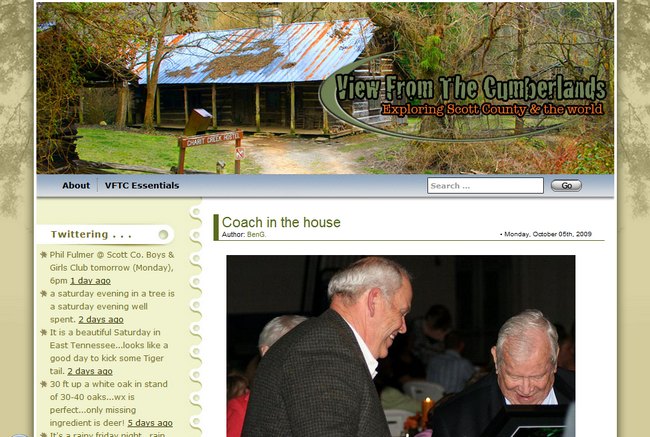
The followings are a few examples of nice modification of this theme from other users. You can view all the nice design in the forum theme showcase.
 |
 |
 |
Change log
2008-08-11 v1.00 – Release
2008-10-07 v1.03 – Fixed some compatibility issues.
2008-11-03 v1.04 – Minor changes. No need to upgrade to this version if you don’t encounter any issues with ver 1.03
2008-12-19 v1.10 – Comment section support paging and threading (WordPress 2.7 feature)
– Exclude the pages in menu if you set it in widgets.
2009-07-14 – Theme is compatible with WP 2.8
Upcoming change
- Add a drop-down menu in the header links.
- Add special font for the header title.
123 Comments
Trackbacks/Pingbacks
- Sumer is icumen in « chez michel - [...] season) than Summer, I guess it’s time to change the markedly autumnal look of my blog. The Maple Leaf…
Leave a Reply


Hello,
Thanks a lot for this design!
Two issues that would be nice if you could look into:
1. Make it possible to use longer blog post titles. At the moment, if your post tile is too more than one line long, the text appears on top of the ‘author’ info.
2. When viewing images with a thickbox or lighbox plugin, the images do not seem to center properly. There is a slide shift to the right.
Thanks once more!
Hi,
For the first issue, I don’t have a better way to make it look better. The only way is to limit the length of the post title. 🙁
For the thickbox or lightbox plugin problem, can you give me the url of your blog so I can go and see what the problem is?
Thanks for replying to my comment.
Here is my blog.
As you can see, I edited the code to account for longer post titles. It would be nice though if it could adjust…
Thanks again!
I clicked on the image and it aligned at the center. Can you elaborate more about the thickbox problem?
Btw, I might not be able to address your issue if it is too difficult as I don’t support plugin issues as specified in my support policy.
Hi Brian,
i have the same problem as comment #64: At first the footer was positioned nicely but when i set WP to display 10 messages in a page the footer skips down. Rarely when i set WP to display 4 messages (as it was before) the footer is still positioned at de last position. So it moves down but never goes up again to the previous position. What can i do to restore the origional position of the footer ?
Greetz,
Gerrie
Hi Gerrie,
I set the sidebar’s padding-bottom to 700px to make sure the top and bottom backgrounds having enough gap.
You can change the padding-bottom to suit your requirement.
open style.css, find
change 700 to smaller number, and you will see the difference.
I LOVE this theme Brian! Thanks for creating it. The header photo of the Maple Trees was the first thing to capture my attention. And the rest of it is beautiful too.
Hi! Thank you for your beautiful themes! I love especially the Maple Leaf and The Green light ones! Though I have a little problem! In both themes, category children don’t sit under their category parent, instead they sit as if they were parents themselves.
Any chance you know what’s going on?
Thank you very much!
“Show hierarchy” option at the category widget options solved my problem! Thanx anyway 🙂
I can’t manage to get the date on each post of my blog. How can I fix it? Thanks.
Please go to Bloggerstyles.com for the support of the Blogger template.
Love the theme been using it for sometime on a charity website. The drop down menus would be excellent.
Regards
James
Hi Brian, Just found your site and so pleased I did – great templates.
I am now using the Maple Leaf theme and noticed one issue. In my photo album it displays correctly in most browser but not in Camino. When I select an album I only see a series of lines, not the photo previews. If I select one of the lines I can then see the photo, but not before.
Just thought you should know.
Thanks, Jane
http://www.canadajane.com
Hi Jane, thanks for letting me know about the Camino browser issue but my themes are only compatible with major browsers ( http://www.templatelite.com/all-major-browsers-supported/ ).
Excellent !!!
Regards
Jorge
Buenos Aires
Excellent theme, i just use it in my girlfriend church webpage http://www.visionyrestauracion.com (in spanish)
I just want to make a request, can I change the header image? this one is really beautifull, but the minister wants to put other, please let me know if there is not a problem, all the copiright of the theme will stay in the webpage
Yes. You can modify the design as long as you keep the credit links in the footer.
I love this theme!
I have never thought one theme can be so beautiful.
Does anyone know how to remove the extra blank space at the bottom of the theme pages?
@NOok, this theme has a minimum height to cater for the background gradient so when your post height is short, you’ll see extra blank space.
I’m using this not so much as a blog, but for static pages using wordpress and the theme as a site layout. Is there any way to remove that extra space? It’s about 3x too much.
@NOok, it is possible to reduce the extra space but I am currently too busy to look into this.
How can I remove the search option from the page bar??
@NOok, you can refer to this comment to get the instruction for the removal of the search option.
Tried that, doesnt seem to work… Section was replaced in the header, search is still there. site is http://www.coryclawson.com. I’ll try again
I actually did fix it somehow the page was not refreshing, sorry.
@NOok, you need to do one more step to remove the search image. From the last two sentences of the comment I directed you to:
“Secondly, open this image: menu_bg.jpg
Remove search box graphic using image editing software.”
Brian, thanks for all the help. For some reason my server was being flaky and not uploading the image with the FTP program I was using, it was just cued up not moving, and my .php edits were not submitting either. Once it went through it all looks proper now.
The only thing I need to address is the menu bar. Will it show more than 3 page links on the menu bar?
@NOok, I didn’t limit the number of links to be shown in the menu bar. Just make sure the length of the links doesn’t exceed the width of the theme and you’ll be fine.
I see. It appears the contact page should appear in the area where the search was, the area looks large enough but I cannot get it to appear.
@NOok, there is nothing in the contact page and the contact link in the header is in the right position so what exactly is the issue?
Hello, on the menu bar where the search used to be. I am expecting the menu bar to show all 6 pages I have created, which includes the about me or contact page. I may be adding more if there is room, but right now only 4 pages appear with a blank spot where the search used to be. If it is not possible to do that is fine, it just seems like it should. I have included link to image of what links I an trying to position in the menu bar:
http://i196.photobucket.com/albums/aa156/NOOk_023/arrows.gif
@NOok, I saw you remove the search from the menu bar. To display more header links, you need to increase the width for the menu section.
Edit style.css, find #menu ul, and modify the width under it. The current width is 550px and you can change it up to 850px. Hope this helps.
Brian this is perfect, I really appreaciate your attention to this matter. I am sure more people will want to use this theme with this information.
Last questions and I think I am done! How can I remove the tags and meta headers in the left column? Also, how can I rename the pages/categories/archive headers in the left column, or is that possible?
figured this one out thanks.
Is this theme: based on, an updated version, old version, or not related to “Autumn Scene” theme seen here:
http://wordpressthemesbase.com/view/814.html
???
@Shawn, the “Autumn Scene” theme was actually modified by someone base on the Maple Leaf theme. The theme was modified using the older version (v 1.03) where there are some code issues. The latest version is 1.10.
I am not happy to see that “David” claimed to be the author of this theme but in actual fact, I am the original designer.
I need to reiterate that ALL the themes you find in this site are originally designed and coded by me!
Love this theme. I do have an issue. When I add a widget, all the sidebar content (categories, blogroll, etc.) EXCEPT for the widget disappears. Remove the widget, the sidebar content returns. What am I doing wrong??
@BenG, that is what widgets do. You have to drag all widgets you want to show in sidebar. If no widget is added, the sidebar will show the content as defined in sidebar.php
Makes perfect sense now. I’m an idiot. 🙂 Thanks…
I just love this theme, but is this not available for bloggers???
@Vaish, as far as I know, this theme has not been converted into Blogger platform yet.
Dear Brian,
I like to change the appearance of MapleLeaf.
The BG_TOP and BG_BOTTOM_REPEAT.JPG are already changed but the sidebars ar still the same color.
Can i change it within the Style.CSS ?and if so what do i have to change ?
Greetings from Holland.
Gerrie
Never mind !
Found it in the style.css (background) and changed it.
Happy new year,
Gerrie
theme compatible WP 2.9 ?
Yes. All my themes are compatible with WP 2.9
Hi, my customize “Maple Leaf theme” here:
http://img99.imageshack.us/img99/7153/kackab01.jpg
http://img718.imageshack.us/img718/184/kackab02.jpg
@Dave, please post your issue in the Maple Leaf forum and I’ll address there.
Hi Brian,
Thank you so much for an awesome theme. It wasn’t until just lately that I noticed that there was not a tab for “Home”. Could you please give me directions for how I can add this?
Thanks so much. I appreciate your theme.
Best regards,
Judy Conway
@Judy, you can refer to the similar thread here. If you are having problem, please go to the Maple Leaf forum to further help.
.