


Latest Version: 1.10
Updated on: 2015/05/05
Mouse IT is a clean quality theme for computer related blog. Fully compatible with IE6, IE7, Firefox, Safari and Opera browser.
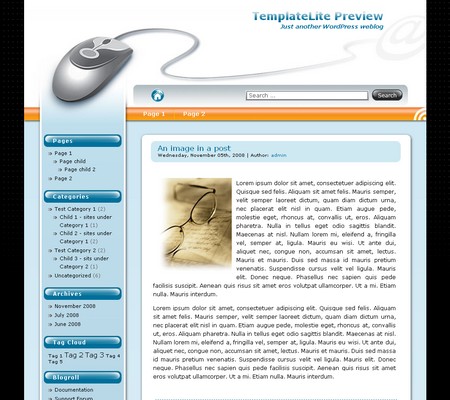
By using this theme for FREE, you agree to accept the external links.





 Main Features
– Smooth gradient background no matter how high your blog is
– Glossy blog title text effect
– Gradient Font Effect
– Compatible with IE7, IE8, Firefox, Chrome, Safari, Opera
– W3C XHTML and CSS compliant
– Gravatar enable
User Showcase
The followings are a few examples of nice modification of this theme from other users. You can view all the nice design in the forum theme showcase.
 |
Change Log
2008-07-28 v1.00 – Release.
2008-12-22 v1.10 – Comment section support paging and threading (WordPress 2.7 feature)
– Exclude the pages in menu if you set it in widgets.
– Fixed some compatibility issues.
2008-12-22 v1.10 – Delete 1 line in style.css, no revision.
2009-07-14 – Theme is compatible with WP 2.8
Upcoming change
- Add a drop-down menu in the header links.
32 Comments
Trackbacks/Pingbacks
- Save The Renault Bears - [...] new theme is based on an original from Templatelite called MouseIT and we all loved it and just wanted…
Leave a Reply


Thanks for the suggestion. I appreciate it. We will look into adding a second sidebar for this theme.
Currently, we are working on our 6th theme and it will be ready in 1 week. Thereafter, we’ll overhaul templatelite.com and the new design should be completed end of October.
Love the theme, trying to figure out how to include wp_pagenavi in it. Any suggestions???
Regards,
NeoXP
NeoXP, please go to http://lesterchan.net/wordpress/readme/wp-pagenavi.html for detailed installation instruction.
plz help.
why this theme is not too good for my blog
but,if you link here > http://dikma.web.id/2008/09/27/installing-and-configuring-apache-on-windows-xp/
than result is very good
Dikma, the problem lies in this post http://dikma.web.id/2008/10/04/operator-and-polipo/ (Operator and Polipo). You forget to add </div> in the post. Please edit the post in the HTML mode and add this code.
hehehe
Thank so so much, …
When I use this theme in my blog and view the site in firefox, it has a couple of xml version codes on the left hand side, but no problem in IE, any reason why?
Angel, I saw that you changed the theme to Maple Leaf so there is no way I can check the Mouse IT issue.
Hi, am just new to WP and blogging and really enjoy your template styles. Just have a few questions:
1. Sponsors is spelled incorrectly (at least for the US-Eng. Where can i change that?
2. Can I be notified when the drop-down feature is released?
Thanks,
Hose
Hoseman,
1) You can correct the Sponsors text in the widget page.
2) Please subscribe to our RSS so you’ll be notified when the drop-down feature is released.
I too am having the issue with tags displaying on the page. I am running MySql 4 and WordPress 2.6.1. I have left the theme active at http://games.imagitronics.org/ in hopes that you might be able to help.
Thanks,
Tim
Sorry to double post, but I should have added additional information. I downloaded the latest version of Mouse-IT from your website today (1.01 I believe?) and I’m viewing the page in Safari 3.2 on Mac OS X.
Tim, I can’t troubleshoot the problem as you seem to change your theme.
Hi,
WP 2.7 is out and the only thing that is stopping me from the upgrade is the Mouse-IT
compatibility with the new version. Just wanted to make sure if it’s compatible and if it’s
not – when can we expect the update?
And by the way – thanks! Amazing theme!
Ozzik, we are working on releasing all our themes that are compatible with ver 2.7. They should be done in one week time. Please check back our site for new revision.
Brian, It’s Deeanne again, I am the one that is having trouble with the Green Light 1.03 by Template.com. I had written you and telling you that on the right hand side bar my script or text doesn’t show up. I have only written maybe 4 posts and I think it was my last post that the sidebar didn’t show up. You had told me to Change the theme to wordpress default theme and see if you still find the problem. If no such problem can be f ound in the default theme…upload the lastest version 1.05 to your server. I did try to update the theme but nothing happened. I’m not sure what is going on. I’m just not a techi and I was over the moon when I got the theme installed the first time, then something went wrong. Any suggestions…I’ll buy you a beer, or a cup of joe. If you could contact me and help me. thanks
Deeanne, I saw your blog, writinginthepines.com, is using another theme. Therefore, I can’t figure out what your problem is.
Hi again,
first of all, thanks for the updated theme – it’s great.
One thing I noticed (through awstats) is that there are a lot of 404 errors searching for
this file: /wp-content/themes/mouse-it/images/content_bg.jpg
I looked at style.css and this is the section containing the file:
#content{
float:right;
padding: 0px 25px 0px 10px;
width:615px;
background:url(‘images/content_bg.jpg’) no-repeat right top;
Of course, there is no such file in the “images” folder.
And while I know that I can just delete this line, I would rather see what would
the original intention look like:)
So can you please update the theme with the missing image? Or just upload it
separately?
Thanks a lot!
Hey,
I was just wondering if you saw my last comment, as it’s still awaiting moderation…
Hi Ozzik,
Sorry it was my mistake. Please just delete that line
background:url('images/content_bg.jpg') no-repeat right top;in style.css.
Thanks for reminding 😀
Hi. I’m trying to find a theme that:
-works with WordPress 2.7x (I use 2.7)
-is widget ready
-has two columns (right sidebar)
-I’m able to customize the header (don’t care on size)
– eventually as I learn more, I can edit the CSS file to change the background
I do like this theme (MouseIT) – do you fulfill those requisites? If not, do you know a site where I can go to punch in my variable requests and search themes that satisfy them. Thanks!
I’m also on twitter – /mikeromard
Hi Mike, you can go to Themegrade.com to search for the themes that fulfill your requirements. However, the themes on that site might not work with WP 2.7.
nice theme, i’l try
Hi, I encounter some problem after activated the theme.
Some program line error appear on the left side bar.
I am using wordpress 2.8.4.
Will you coming out with a new release ?
Thanks
@Kent, I think your web server does not support MIME type, image/svg+xml, for the extension svg.
You should add image/svg+xml for the extension svg, otherwise Mouse IT won’t work well.
You can ask your web hosting provider to help or login to your hosting control panel to add.
Alternatively, you can modify .htaccess, just add
AddType image/svg+xml svg
into the first line of .htaccess located in your root directory. (Ref: http://www.besthostratings.com/articles/mime-types-htaccess.html)
After added, you have to clear the browser cache and see the change.
Dear Brian,
Is it possible to add comments to the page option ?
I exchanged the comments.php and the page.php with my own from Maple Leaf (i edited i few years ago with your instructions) but the layout then gets lost. I asked you earlier this weekend a question regarding the font color of the post option. That is solved, i had made a mistake in the style.css.
Thanks
@Gerrie, thanks for supporting my themes since year of 2008!
I no longer provide support in the comment section so please post your questions in the Mouse IT support forum and I’ll address them there.
Hi there:
Is there any way to delete the “Theme Credit” option in the sidebar?
Thanks
K
@Kis, to remove the credit links, you’ll need to purchase the ad-free package of the theme that costs $20.
UGH .. that’s the ONLY way?
I am afraid that’s the only way because those links belong to my theme sponsors and I need the funds to continue my theme development.