2008-08-20 posted in About My Themes

I constantly look out for ways to improve my themes. One thing about how special my themes is that I have incorporated a special font in the header title on some of my themes.

Take a look at the demo of our Mouse IT theme, for example. Look at the header title. It doesn’t show one color code but it is the gradient blue.

How do we achieve this effect?
I use a CSS trick to create gradient text effect with a PNG image, no Javascript or Flash.

Can I change the blog title in the Wordpress admin?
Definitely! In the Wordpress admin, follow this process: Setting -> General. Then key in your blog title in the “Blog Title” field.

Is the title SEO friendly?
Yes. The title passed the W3C Validation so search engines can index it easily.

Is it compatible with major browsers?
Yes. This effect has been tested on IE6, IE7, Firefox, Opera and Safari.

A screenshot below shows the header of the Mouse IT theme.
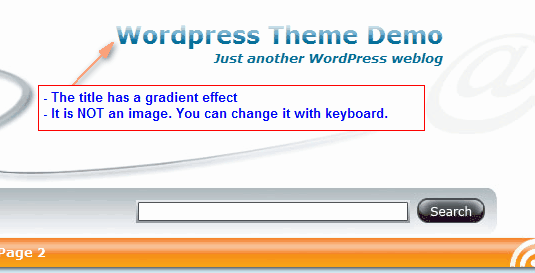
Mouse IT Header Gradient Font Effect

Yes. You hardly see this in other free themes! Hope you enjoy this effect :P

Themes that are currently using this effect:
- Mouse IT

Tags:

Like this post? Please help share it via the following social sites. Your share keep us creating more useful posts.

You can follow any responses to this entry through the RSS 2.0 feed. You can leave a response, or trackback from your own site.
No Responses
Please read if you are submitting Wordpress theme issues:
  • I will address functionality issues pertaining to the Wordpress themes. For other issues, I'll make your comments live and will address them whenever I have time while I also hope that other users can solve for you while waiting for my reply.
  • However, if you are kind enough to make a small donation, I'll give the first priority to resolve any of your issues. Simply donate to my Paypal via wpsubmit @ templatelite.com and specify your comment ID.
For the full detail of how I manage my theme support, click here.
Your comment will be moderated before it goes live.
Leave a Reply

XHTML: You can use these tags: <a href="" title=""> <abbr title=""> <acronym title=""> <b> <blockquote cite=""> <cite> <code> <del datetime=""> <em> <i> <q cite=""> <strike> <strong>