


Latest Version: 3.00
Updated on: 2015/05/02
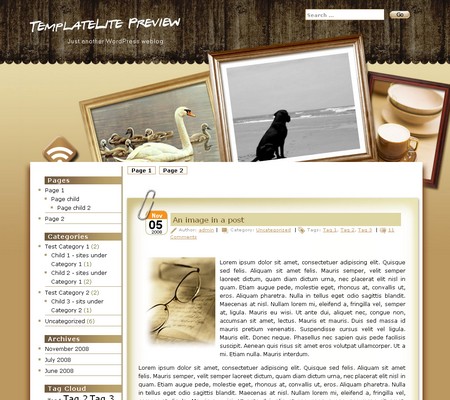
Nicely designed Photo Frame theme. You can replace the picture in the middle frame with the photo of your choice.
By using this theme for FREE, you agree to accept the external links.




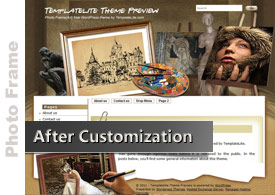
The following is an example of a custom design of the Photo Frame theme.
 |
|
 Main Features
– User-friendly Options page
– Custom menu
– Automatic Thumbnails
– Different design for sticky post feature
– Compatible with IE7, IE8, Firefox, Chrome, Safari, Opera
– W3C XHTML and CSS compliant
– SEO ready
– Gravatar enable
Blog Title and Description
The demo is showing a special font as below:

By default, after you install the theme, the blog title and description are showing the Time News Roman font.

You can change the font style by following this instruction:
Part 1: Modifying Font Style
– Download this PSD zip file (also include the font that I use)
– Extract and open the PSD file in the Photoshop/ImageReady/Gimp/PaintShop program
– Change the title and description using your desired font (you are free to modify the header image if you want)
– Save the image using this name: bg_header.jpg
– Upload the image to your server in the “/styles/music/” folder
Part 2: Activating the Style
– Login to your WP admin
– Go to the options page of the Photo Frame theme under “Appearance -> Photo Frame”
– Find “Theme Style” under “Layout Setting”
– In the pull-down menu, select “default.css”
– Save the setting and go to your site to see the changes.
User Showcase
The followings are a few examples of nice modification of this theme from other users. You can view all the nice design in the forum theme showcase.
 |
 |
Change log
2008-09-11 V1.00 – Release
2008-10-07 V1.04 – Based on all your feedback, we have changed a lot of things in this theme 😀
2008-10-21 V1.05 – Remove one line in CSS to fix Firefox compatibility issue
2008-11-03 V1.06 – Minor changes. No need to upgrade to this version if you don’t encounter any issues with ver 1.05
2008-12-20 V1.10 – Comment section support paging and threading (WordPress 2.7 feature)
– Exclude the pages in menu if you set it in widgets.
2009-07-14 – Theme is compatible with WP 2.8
2011-05-16 v3.00 – New – Added drop-down menu, ad-widget, Options page, advanced automatic thumbnails, custom style, custom menu (works on WP 3+ onwards) and enabled localization (translation).
105 Comments
Leave a Reply


Hi
Thanks for share this beautiful template. I´m trying solve a problem on it.
When I put one thumbnail image in the post with no alignment all is ok and the image show in the left side. But when I define left or right in the alignement option the image show out the post area (too up) and dont complete the post frame. I´m not expert in CCS styles, but i´m trying solve. If you solve first, please tell us. Thanks again. 🙂
Hi Miguel, I have just fixed the problem by adding this code “clear:both”. I have uploaded the new version at http://www.templatelite.com/download/photoframe/photoframe.zip
Hi
Love what you did with the design. It only seems that only 4 fixed pages are being displayed in the “menu”. Can this be changed (somewhere) ?
Thanks and goog luck
Pim
Hi Pim, the 4 fixed pages that you see in the demo is just for illustration purpose. You can add as many pages as you want in admin -> Write -> Page. After you have published the page, the link will appear under the “Pages” in the left sidebar.
Looks great – thanks so much. This design is exactly what I’ve been looking for!
Thank you!!!!
I’m using your photoframe theme for my WP weblog. I love it a lot. Is there a way for me to customize the left and the right picture? I put some pictures for the middle photo-frame and it works fabulously. I don’t have knowledge on CSS so if you can tell me what to do to change the pictures on the left and right photo-frame, that’ll be great. But, if there’s no way I can change it, that’s cool also. I still love the design.
Toddy, there is no direct way to customize the left and right picture. However, if you know a bit of Photoshop or other image editing program, you can modify the image “header_bg.jpg”. A good example is bloghomedenver.com. The images on the left and the right side are static but the middle one is random.
Thanks for the input. I did change the picture on the left side, but it’s rather impossible to change the right one because there’s only half of it on header_bg.jpg. The other thing is there’s a dark area around the header after I changed the picture. But, it’s only visible on Safari while it’s not that visible on FireFox and IE. Why is that?
Toddy, for the right picture, you need to first merge these two images: header_bg.jpg and bg_top.jpg. Add your desire picture and crop the image back into two.
I viewed your site on Firefox, IE and Safari and they look the same. No dark area around the header that you mentioned. Can you send me a screenshot of that?
HI I NEED HELP! I AM SO INLOVE WITH THE THEME PHOTO FRAME!!! SO BEAUTIFUL HOW CAN I GET THIS???
THANK YOU . YOU GUYS ARE SO AWESOME.
Muffin, follow this installation guide and you should get this theme live: http://www.templatelite.com/installation/
Thanks for the theme, I have put it onto a site I maintain (www.WhitchurchArts.com). However, I have noticed that my statistics count for visitors has dropped straight to zero since doing so. Surely, it is not because people do not like the new look, but perhaps of a counting bug in the template? Are you aware of such a problem?
…and an idea: if you are going to make the three photos changeable by users, then can you also add an optional logo that fits at the top left? I painted one in on the WhitchurchArts.com website, for example. Thanks again.
Hi! I loved the theme. It seems very nice, but I’m having trouble to use it. After uncompress the content to /wp-content/themes, it sucessfully appears in my Available Themes section of Administration. But when I select it, instead of displaying the preview image, it just displays part of source code, like:
“# ‘
‘, ‘after_widget’ => ‘
‘, ‘before_title’ => ‘
‘, ‘after_title’ => ‘”
I’m using WP in Brazilian Portuguese.
Can anyone help me?
Thanks in advance.
Me again…is the list of pages along the top limited to just five? Can this be changed?
My site’s statistics went to nothing after switching to this theme. According to the WordPress FAQ, http://wordpress.org/extend/plugins/stats/faq/, this must be at the very bottom of the theme’s footer code (just before the item):
Andrew, first of all, the Stat issue. To fix it, open footer.php. Then add
<?php wp_footer(); ?>
before
</div>
</div>
</div>
</body>
</html>
Thanks for pointing out the problem. We’ll include that fix in the next revision.
Second question: “can you also add an optional logo that fits at the top left?”
We won’t add logo to our themes as every company has their own logo so it is best for them to design their own.
Third question: “is the list of pages along the top limited to just five? Can this be changed?”
The list of pages in the top menu is NOT limited to just 5. You can add as many pages as you want but the display of links will be limited to one line. Extra links will become hidden.
Rad, your issue is not so straight-forward for us to resolve at the moment. We’ll work on it and release new revision soon. Notification email will be sent to you upon release of the new revision.
Thanks guys. Clarification of the logo idea: just like you have a rotating picture based on files in a directory, have a logo shown based on a file called “logo.jpg” in that directory (and it is not rotated into the picture frame). The logo would be a the top left (see what I did on http://www.WhitchurchArts.com as an example — I know at least one other user of your theme has done something similar).
There is also something not quite right with the inter-line spacing of my categories/pages/links widgets in the left column. However, since I use a plug-in for them (WP-dTree) I am not sure how to find out where the problem is. The plug in works fine on my personal website (www.Reeves-Hall.net) which doesn’t use this theme.
Andrew, regarding the logo idea, imagine you upload a logo image with white background while the header background is non-white. It just won’t display right. Unless we create another frame for logo uploading, it is just not feasible to include that feature.
As for the WP-dTree plugin, I am sorry that we currently do not have enough resources to look into that issue. I seek your understanding.
No problem – looking forward to your next release! Thanks for your help.
Hi,
Thanks for the response. Feel free to contact me if you need more information on the error or to run some tests.
These are some of the most beautiful WordPress templates I’ve seen! I love this one the most (so far it’s my all-time favorite that I’ve ever used for this site) and anyone can see it by clicking my name.
Hi,
I’ve just upgraded the theme version (I was using version 1.02 found in WP Theme Directory) with newst version (1.04) and the problem is resolved. I’m very pleased with the theme.
Congratulations!
Thanks for all the help.
Hi,
I love your theme very much. That’s exactly a great job! However, I’m a newbee to WordPress so I have a question that how I can enabe plug-ins in your theme? Do I need some Hack technology?
Maybe I should clarify my question. Previously I enable Page-Navi, Get Recent Comment and Post-Views plug-in. Now they can’t work due to I use this theme. How can I use them again?
Alan, I checked the total number of downloads for the three plugins in WordPress plugin section and found out that none of the plugins you use has an all-time downloads of 200,000.
Our policy is that if the all-time downloads in WordPress is less than 200k, we will not look into the plugins issues due to the limited resources we have.
For the details of our plugin policy, please click here.
Hi, Brian
OK, I see your policy and I will try to add it by myself. Anyway, thanks for the great work!
Alan
This has be to best theme I have ever come across. I want more than anything to use it but I have run into problems. The themes that came with WP work fine but when I try to switch to you theme I get this error:
Fatal error: Call to undefined function: is_tag() in /web/wp-content/themes/photoframe/index.php on line 25
Any help you could provide in fixing this problem would be awesome. This is the fist time I have played with any of this stuff so thank you very much in advance.
Wingnut, that is because you are using WordPress ver. 2.2.3. is_tag is released on 2.3. Our themes support WordPress from ver 2.3+ onwards.
My Firefox v3.03 and WhitchurchArts site using v1.04 of this theme has a problem: clicking on a post’s title does not do anything.
If instead I use IE7, or another theme, then the single page view of a post is displayed.
Anyone else having this problem?
~Andrew~
Andrew, I have fixed the issue and uploaded ver 1.05
If you encounter any other problems with the theme, please let me know.
Hi,
Great theme, I’m tweaking it a little bit so I can use it for my website.
I’m currently adding my own pictures to the left and right frame. I’m not a Photoshop expert, but that will normally work out fine.
However, it may be related to me, but the pictures that show up in the middle frame always seem so ‘blurry’ to me, like they have been taken by some cheap cell phone. I’ve saved the pictures in the required 320×240 format and they look perfectly normal to me. On the site itself they get blurred?
Obviously, the result is far from ideal. Two rasor sharp images to the left and right, and one blurred image in the middle.
Is this normal?
Tom, can I take a look at your site?
Hi, Brian, thank you for making this fantastic theme! I have a couple questions for you.
In IE, the page shows up strange. The sidebar is in the correct spot, but you have to scroll clear to the bottom of the sidebar before the main post area shows up. Things appear normally in all other browsers. I’ve had a couple readers complain about the IE problem, so I’m trying to figure out how to fix it. I did download your most recent update, but I’m still having the problem.
Since I downloaded the new update, I’m getting three new lines in the “Meta” area. I don’t want those to be there. I edited sidebar.php to remove them, but for some reason they still show up even though the file no longer lists them. Is there another file I need to edit?
Thank you!
Here it is…
Cindy, I saw your source code, looks like you forgot to close the <div> block in the sidebar text widget. Please correct and check again.
Brian, thank you for taking the time to look at the code. I can’t locate where a tag is missing. The only I see in my sidebar text widget is this:
The closing tag is already there. I’ve tried changing my tags to instead, but that messes up the alignment so I changed it back.
I’m going to keep fiddling and trying to figure it out. Thank you very much for any help.
Ugh, I just realized that the comment form doesn’t allow the html code (that should have been obvious!). Let me see if I can figure out how to make it show up…
Okay, I guess not. I’m sorry…thanks for your help anyway. 🙂
Cindy, I am sorry your problem is not caused by <div>, I have checked your code in detail and found out the problem 😳
Please check your sidebar textwidget, find
Remove <li> and </li>
The <li> </li> break the structure of the theme. I believe it will be able solve the problem in IE.
Thank you very much! That was exactly the problem, and things look exactly as they should now.
Hi again, Brian. I notice that you’ve posted my thanks, but you’ve removed my question about the new advertising lines in the Meta area of the sidebar. These WERE NOT there in previous versions, and I DO NOT want them there now. You’re providing this theme for “free” so I do not see why I should be forced to run your advertisements.
By removing my question regarding how to remove these listings, you’re telling me that you’re not willing to continue providing the Photo Frame theme for free but you’ll now require every user to run advertising for you. That really bothers me, Brian. If you don’t want the themes to be free-use, that’s fine, but please just say so. And notify bloggers up front (before they download!) that they’ll be required to run your advertising.
I’d appreciate a response along with instructions on removing those advertising lines from the Meta. If you’re not willing to do that, I’ll be looking for a new theme. I’m sure I’m not the only blogger who doesn’t want to provide advertising for someone who says his themes are free to use.
Thank you.
Cindy, I was on a holiday in Thailand so I have limited time to address your meta link advertising issue. That’s why I remove part of your comment. Now I am back to address the issue. Sorry about the delay.
First of all, let me explain our policy.
Base on our terms of use, you MUST keep the footer links if you want to enjoy the free theme downloads.
In this theme’s newer version, you can also find our credit links in the meta section but you are FREE to remove it. It takes some programming skills to remove the links so I have sent a file with instruction over to your email. Please check.
The reason why I added the credit links in the meta and make it somewhat difficult to remove is because I found some sites using my themes but they don’t provide the credit links back from the footer. They REMOVE my footer links without notice! As it took us tremendous amount of time to design clean and quality themes, removing the footer links is like ignoring our effort. I know there are some guys out there who use our themes but remove all our credits without our notice. That’s just the way of life 🙄
Tom, I have programmed such that the picture in the middle frame is 90% of the original quality. I don’t make it 100% because if the filesize of the uploaded images are too large, the loading time will be increased.
However, you can change the quality to 100% by following the instruction below:
Edit this file /images/frame-img.php
Find
imagejpeg($photo,”,90);
Replace 90 with 100
imagejpeg($photo,”,100);
I want to thank you for making this template available. It is just what I wanted for my site.
I’ve had a lot of fun customizing it. Fixing the photos on the front involved editing three photos. I thought you might want me to tell others how I did it to help them.
1. Open up all of the photos you need to edit, these are:
bg_top.jpg
container_topbg.jpg
header_bg.jpg
2. Open the photo that you want insert in the right frame, make a copy, and resize the copy to the max size for that frame.
3. You need PhotoShop or PaintShop Pro V7 or higher for this – I did it in Paintshop Pro
Drag and drop the images into a new image, each image should be its own layer
Drag and drop the photo that you want to place in the left photo-frame into the image, also as a new layer
Make everything slightly transparent so that you can see all the edges for all photos
Move all the photos until it looks like one cohesive picture, with the photo that you want placed exactly as you want it to appear in the frame. The edges can be outside of the frame -you will edit to get rid of them.
4. Now, this is where it gets a bit finicky, I can’t give a lot of detail – who understands, understands:
a. hide all but the graphic you want to edit and the new photo.
b. Make the new photo layer active and transparent, then draw your outline along the edges of the target photo – do not use feathering or screen smoothing.
c. Once you get the desired shape, cut and paste into a new copy of, for example, header_back.jpg – if the transparency remains, restore to normal… and see if the picture fits – if not – repeat until it does.
5. Repeat for the other two source graphics in the template
6. Save under correct name in a different directory (I never overwrite original files, I might need them). Upload the graphics to the appropriate directory and test.
It took me approximately 30-40 minutes to do this, and I am very happy with the results.
I hope this is helpful.
thanks again for the template!
Dvora
Would it be possible to please get a psd Photoshop file for the theme? I use the Custom Category Icons plug-in and would like to design category icons that match the theme’s design and figured you may just have this.
Eric, you can get the PSD file at a cost of $30. Please refer to our terms of use for details.
Aiden from Aidenchong.com was kind enough to create a video screenshot to explain a problem about the overlapped post title and overlapped comments. You can see the details here
I’ll try to fix that issue in the next revision.
I have three questions for you regarding this template (which I currently use)
1. How do I enable the rss button so people can sign up for my blog?
2. Is it possible to add a newsletter or email sign up box on the right side? If so, how do I do that?
3. How do I upgrade to the latest version of this template?
Thanks for your help.
Pat,
1) The rss button is already enabled and you can find it at the top of the left sidebar.
2) You can subscribe to Feedburner which offers email subscription.
3) Just upload the new version files and replace with the old one.
Brian,
Thank you for your help. I just need to clarify your responses.
1. I have clicked on the RSS button and it shows everything as a runon kind of thing. In other words, it does not provide an opportunity for someone to add their email to the site. Is that how it is supposed to work?
2. How does Feedburner work with that RSS button at the top?
Thanks again for your help.
Pat,
1) Yes. That is how the RSS link work. If you want to use email subcription, you can use Feedburner.
2) When you subscribe to Feedburner, you’ll get a link that allows your users to receive your new posts via email.
To change the link of the RSS button to the Feedburner link, follow this simple step:
Open header.php
Find this code
< ?php bloginfo('rss2_url'); ?>
and replace with your feedburner link. The feedburner link has this format:
http://www.feedburner.com/fb/a/emailverifySubmit?feedId=xxxxxxx&loc=en_US
Brian,
Thanks for your comment. I would post some more video screen shoot for the theme, commenting it. But I won’t be doing it that soon, I need to play around with the video screen shoot program before I can really do that.
Anyway, thanks for the link 🙂
Hi Brian,
I too am using the Photo Frame theme and really like it so far although I am running into a compatibility issue with the latest browsers from IE, Opera and Safari. The theme renders incorrectly whereas in Firefox 3 and Flock it renders as it should.
I checked for the tag issue as described above but it’s not present.
I’m using version 1.02 of the Photo Frame theme and version 2.6.3 in WordPress.
Would an upgrade to the latest version take care of this and if so, what’s involved in the upgrade? A simple over-write of the files maybe?
Thanks!
Hi again Brian,
Seeing as I had some time on my hands, I went ahead and downloaded the latest version and tried it in the various browsers again with the same results. The theme rendering is skewed in IE, Safari and Opera with Firefox and Flock both rendering it just fine.
Guess I’ll be awaiting your suggestions.
Hi ScottW, please check you text widget “Puck”, where you miss the close tag </table>, just add it after </td></tr> and it should solve the problem.
Ugh, it’s always the little details isn’t it Brian? Thanks! I missed that one by a mile.
You do good work and go way beyond the call in helping people with trouble-shooting your themes. (big round of applause) 8^)
Is there any way to get the theme displayed on the login page as well?
Just wondering… can the sidebar be switched to the right easily? Thanks.
JackH, you can use this plugin to change the theme for the login page:
http://codex.wordpress.org/Creating_Admin_Themes
Changing the sidebar to the right involves drastic coding change and I am sorry that I can’t do it at the moment.
Thanks Brian. I am do not understand CSS and how it works. Is it possible to tell me the exact code that I need to create in order to create a login page using the Photo Frame theme? Thanks a lot.
JackH, I found that plugin but have not studied how to make it work. Since this is not a functionality problem and I am extremely busy with releasing new themes, I’d have to pass this for now.
I have just installed WordPress version 2.2.2 and PhotoFrame template version 1.06, however I keep getting errors that it can’t find various functions, such as:
Fatal error: Call to undefined function is_tag() in …/photoframe/index.php on line 25
and
Fatal error: Call to undefined function the_title_attribute() in …/photoframe/page.php on line 9
I’ve tried downloading other templates from templatelite (Maple Leaf 1.04 and Green Light 1.05) and those template produce the same errors. However, if I use the WordPress Default or Classic templates, they work fine without errors.
Am I missing a file which contain these functions? If so, where do I get that file? I would like so much to use this template — it’s beautiful!
Hi!
I just started using your theme – and I love the flexibility with the photos on the top. However, in a previous post where I had small photos inserted into a table, they come up as just teeny-tiny pictures now. I’m using Flickr for my pictures. They looked fine on the previous default WP template. Any suggestions?
Thanks!
Sorry – I didn’t read all the instructions. I am using the latest version of this theme (downloaded today, 11/29), and WP 2.6 (also upgraded today). Thanks!
Kathy, our themes may not work in WordPress version that is lower than 2.3. It should work fine after you upgrade it to higher WordPress version.
Stephanie, your Flickr images look fine to me on the home page. Can you send me the URL where the flickr images are having the problem?
Thanks for your response Brian! I initially installed WordPress from my ISP, so I didn’t realize they didn’t have the most up-to-date version of WordPress to install. I’ve now upgraded to version 2.6.5, and now the PhotoFrame template works like a charm! I love it!! Thanks so much for your help!
I’m getting this template working for a site I’m converting from HTML to WordPress. Is there supposed to be a “Home” button at the top, where the links for pages appear? Is it possible to add this without tearing apart the PHP and CSS code?