


Latest Version: 1.00
Added on: 2015/04/17
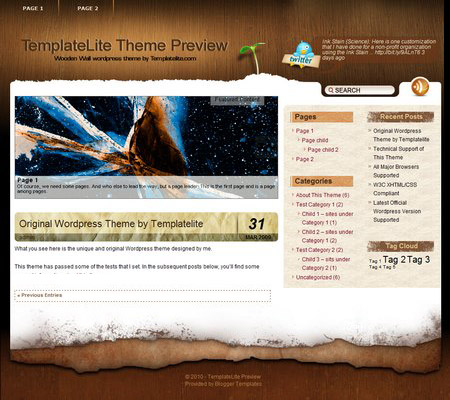
The Wooden Wall theme is the second theme besides the Sunset Farm theme to have the Options page. The theme’s Options page allows you to define your own RSS feed, traffic tracking code and Twitter setting (input Twitter user and hide/display Twitter icon) etc. You can also control the look of the theme by selecting or defining your own theme style.
For the details of how my Options page works, please refer to this page.
By using this theme for FREE, you agree to accept the external links.


Main Features
– User-friendly Options page
– Different design for sticky post feature
– Compatible with IE7, IE8, Firefox, Chrome, Safari, Opera
– W3C XHTML and CSS compliant
– SEO ready
– Gravatar enable
Drop-down Menu
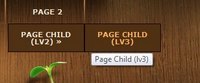 The Wooden Wall theme has a multi-level drop-down menu. This is another feature that will be added to all my future themes.
Plugin
There is a featured content section below the header link. This feature is built in using the Featured Content Gallery (FCG) plugin. Please download the latest version and follow the instruction found in “Readme.txt” to do the setup.
If you do not want to show this feature, just don’t install the plugin.
Blog Title and Description
The demo is showing a special font as below:

By default, after you install the theme, the blog title and description are showing the Arial font.

You can change the font style by following this instruction:
Part 1: Modifying Font Style
– Download this PSD zip file (also include the font that I use that is available free from fonts4free.net.)
– Extract and open the PSD file in the Photoshop/ImageReady/Gimp/PaintShop program
– Change the title and description using your desired font (you are free to modify the header image if you want)
– Save the image using this name: bg_header.jpg
– Upload the image to your server in the “/styles/custom/” folder
Part 2: Activating the Style
– Login to your WP admin
– Go to the options page of the Wooden Wall theme under “Appearance -> Wooden Wall”
– Find “Theme Style” under “Layout Setting”
– In the pull-down menu, select “custom.css”
– Save the setting and go to your site to see the changes.
Ad Widget
An ad widget can be found under the “Available Widgets” section. You can drag the widget to Sidebar 1 and/or 2. This widget allows you to add your advertisement while keeping the sidebar design. Please limit the width of your ad to 160px.

View all my themes
Change log
2010-02-17 v1.00 – Release
8 Comments
Trackbacks/Pingbacks
- 15 Blogger themes adapted from Wordpress - Marked Lines - [...] Download (Blogger)Download (Wordpress) [...]
- Free Qualtiy WordPress Themes - Page 13 - Webmaster Forums UK SEO SEM Webmaster Community Forum - UKWW - [...] can define your own RSS feed, traffic tracking code and Twitter setting etc. DEMO |…
- Free WordPress Themes by Dulcepixels - Updated Constantly - Page 8 - Webmaster Forum - [...] can define your own RSS feed, traffic tracking code and Twitter setting etc. DEMO |…
- Free Quality WordPress Themes - Page 6 - [...] can define your own RSS feed, traffic tracking code and Twitter setting etc. DEMO |…
- Free Quality WordPress Themes by subxpert - Regularly Updated - Page 4 - [...] can define your own RSS feed, traffic tracking code and Twitter setting etc. DEMO | DOWNLOAD…
- Wooden Wall - Wordpress Themes - [...] Demo | Download | WordPress Theme Author: [...]
- Wooden Wall « WP Site – Best Free Blog Designs To Download - [...] Demo | Download | WordPress Theme Related [...]
- ithemes.org - Wooden Wall » Original Wordpress theme by Templatelite... Wooden Wall comes with an Options page where you can define…
- zabox.net - Wooden Wall » Original Wordpress theme by Templatelite... Wooden Wall comes with an Options page where you can define…
- CSS Brigit | Wooden Wall Free WordPress Theme - Wooden Wall Free WordPress Theme... Wooden Wall comes with an Options page where you can define your own RSS…
- Gratis WordPress teman v14 | wpxl - [...] Wooden Wall | Demo | Ladda ner [...]
- Wooden Wall WordPress Theme - [...] Details/Download [...]
Leave a Reply


Oh wow! Definitely one of my favourites! It’s got so many uses. Love it!
christina@
@christina, I decided to make this theme available to the public with no strings attached. You can download the theme by clicking on the “Free Downloads” button below the theme’s screenshot.
And thanks for subscribing to my feed.
cool. Thank you =D
Nice theme. But there are encoded template.php file. How can I know there are not any porn or casinos ads, why I will take ban from google?
@Wallaby, rest assure that I will never ever accept inappropriate advertisers or include malicious links to my themes. That is too big a risk to take for my business.
Hi..can you give the steps how to do it after download? I have trying many times to get the code, but I can’t.
Thank you
@delia, you can follow the installation guide found on http://www.templatelite.com/installation-guide/