


SEO Steps to take after Installing WordPress Theme
There are a lot of articles on how to optimize WordPress blogs for the search engines. However, I still haven’t seen any articles outlining actual steps you need to take immediately after you install a fresh copy of WordPress theme. The information below will attempt to do just that. Step 1: Change the permalink structure How to do it: Go to Settings>Permalinks and then select “Custom Structure.” Use /%postname%/ and write it in the box. Why do it: For more information about using %postname%, click here. The reason why you want to use this permalink structure is because you increase the probability searchers will click your link in the search results and you gain a slight advantage in the rankings also. Step 2: Install the necessary SEO plugins Install the following SEO plugins for maximum leverage: All in one SEO pack – necessary for optimizing title tags, meta tags Redirection – Many SEO features here, but the most important one is that it manages 301 redirects. It will also change all 302 to 301 redirects, for example if your site is http://example.com and the visitor goes to http://www.example.com, this plugin will 301 redirect the visitor to the non-www version (by the way, WordPress, without this plugin installed will do the same just with 302 redirect instead.) Google XML Sitemaps – makes the job easier for search engines to find the pages on your site. Many people recommend many other ‘essential’ SEO plugins but these are the ones I use on Mix The Net and I really don’t plan to add more in the near future. Step 3: Learn more about SEO from QUALITY resources Honestly, most SEO advice is very, very bad. It is based on untested theories. Fortunately, there are some websites that use research when doing SEO and base their advice on real life observations. Moz (http://moz.com/blog) is one of these rare sites . When you visit them, look right under “Most popular guides” where you’ll see free guides on keyword research and on and off-page optimization. The principles they outline there apply to every website, including your WordPress blog. Learn it and use it. Okay so that’s pretty much all. One more thing…if you’re grateful for this post then please go and implement everything I wrote above. You won’t know the results till you go and implement…and believe me, you’ll be surprised what happens when you do just that. Author Bio Darko is a person interested in web design & finding web tools for getting everyday tasks done. His blog is at Mix The...
Read MoreWooden Wall

Latest Version: 1.00 Added on: 2015/04/17 The Wooden Wall theme is the second theme besides the Sunset Farm theme to have the Options page. The theme’s Options page allows you to define your own RSS feed, traffic tracking code and Twitter setting (input Twitter user and hide/display Twitter icon) etc. You can also control the look of the theme by selecting or defining your own theme style. For the details of how my Options page works, please refer to this page. Click on the “Free Download” link above to get the theme now! By using this theme for FREE, you agree to accept the external links. Gain access to the fully layered Photoshop file for quick and easy tweakage. PSD files included for both the main and the sub themes. Ad-Free PackageRemoving the credit links will make the theme to not function properly. Unencrypted main and sub theme files can be purchased at $20. Theme CustomizationDo you want to customize this theme to include images that suit your blog's topic? I can help you with the graphical customization. For more details, please visit the theme customization service page. Main Features – User-friendly Options page – Different design for sticky post feature – Compatible with IE7, IE8, Firefox, Chrome, Safari, Opera – W3C XHTML and CSS compliant – SEO ready – Gravatar enable Drop-down Menu The Wooden Wall theme has a multi-level drop-down menu. This is another feature that will be added to all my future themes. Plugin There is a featured content section below the header link. This feature is built in using the Featured Content Gallery (FCG) plugin. Please download the latest version and follow the instruction found in “Readme.txt” to do the setup. If you do not want to show this feature, just don’t install the plugin. Blog Title and Description The demo is showing a special font as below: By default, after you install the theme, the blog title and description are showing the Arial font. You can change the font style by following this instruction: Part 1: Modifying Font Style – Download this PSD zip file (also include the font that I use that is available free from fonts4free.net.) – Extract and open the PSD file in the Photoshop/ImageReady/Gimp/PaintShop program – Change the title and description using your desired font (you are free to modify the header image if you want) – Save the image using this name: bg_header.jpg – Upload the image to your server in the “/styles/custom/” folder Part 2: Activating the Style – Login to your WP admin – Go to the options page of the Wooden Wall theme under “Appearance -> Wooden Wall” – Find “Theme Style” under “Layout Setting” – In the pull-down menu, select “custom.css” – Save the setting and go to your site to see the changes. Ad Widget An ad widget can be found under the “Available Widgets” section. You can drag the widget to Sidebar 1 and/or 2. This widget allows you to add your advertisement while keeping the sidebar design. Please limit the width of your ad to 160px. View all my themes Change log 2010-02-17 v1.00 –...
Read MoreInk Stain (Science)

Latest Version: 3.00 Updated on: 2015/05/31 Here is one customization that I have done for a non-profit organization using the Ink Stain theme. The main purpose of the site is for hands on teaching of children and getting kids back in touch with nature. Learning science can be so fun and educational at the same time! Click on the “Free Download” link above to get the theme now! By using this theme for FREE, you agree to accept the external links. To activate the Science style of the Ink Stain theme, follow 2 simple steps below: Step 1 Go to the theme Options page in WP admin => Appearance => Ink Stain Step 2 Under “Theme Style”, select “science.css” and save the page. Gain access to the fully layered Photoshop file for quick and easy tweakage. PSD files included for both the main and the sub themes. Ad-Free PackageRemoving the credit links will make the theme to not function properly. Unencrypted main and sub theme files can be purchased at $20. Theme CustomizationDo you want to customize this theme to include images that suit your blog's topic? I can help you with the graphical customization. For more details, please visit the theme customization service page. The following is an example of a custom design of the Ink Stain theme. Main Features – Different design for sticky post feature – User-friendly Options page – Custom Header Menu – Automatic Thumbnails – Different design for sticky post feature – Compatible with IE7, IE8, Firefox, Chrome, Safari, Opera – W3C XHTML and CSS compliant – SEO ready – Gravatar enable Translation Help Needed This is my first theme that allows localization. If you wish to translate this theme into your own language, you can do so with the use of the Poedit program. To find out how this works, please refer to this comprehensive guide. When you have completed the localization, kindly send me the translated files so I can share your work (with your credit) with other users. Automatic Thumbnails Please refer to this page for the details of how the automatic thumbnails work. Drop-down Menu The Ink Stain theme has a multi-level drop-down menu that is using the latest function in WP 3.0. There are two ways to create the drop-down menu. 1) When you create hierarchical pages, the drop-down menu will show up automatically in the header navigation. 2) You can manually define the header links using the custom menu. To do it, first, click on the “Menus” link found under the “Appearance” tab in WP admin. Then follow the instruction on the page to add your custom menu. This feature only works with WP 3+. Plugin There is a featured content section below the header menu. This feature is built in using the Featured Content Gallery (FCG) plugin. Please download the latest version and follow the instruction found in “Readme.txt” to do the setup. If you do not want to show this feature, just don’t install the plugin. Blog Title and Description The demo is showing a special font as below: By default, after you install the theme, the blog title and description are showing the Arial font. You can change the font style by following this instruction: Part 1: Modifying the Font Style – Download this font PSD zip file (also include the font that I use) – Extract and open the PSD file in the Photoshop/ImageReady/GIMP/PaintShop program – Change the title and description using your desired font (you are free to modify the header image if you want) – Save the image using this name: bg_header.jpg...
Read MoreList of Custom Themes
The custom theme list will be constantly updated whenever a new one is created. This page showcases all the custom themes that I have created so far. The customization is done with the principle that the core coding of the theme is left untouched. Only the graphical part is custom designed to suit the topic. Click on the images below to view the bigger screenshot. Theme Customization – Request a Quote If you would like to have your own customized design, take a minute fill out the form below so that I can better understand your needs. I’m currently NOT available for any customization work. You can still send the request if you don’t mind waiting for more than 6 weeks for the delivery of your theme. [contact-form-7 404 "Not...
Read MoreExotic Vacation (Australia)
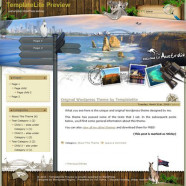
Latest Version: 1.00 Updated on: 2015/04/14 I have been fascinated by the unique charm of Australia. So I decided to customize the Exotic Vacation theme to include some of the major attractions found in Australia. Enjoy! Click on the “Free Download” link above to get the theme now! By using this theme for FREE, you agree to accept the external links. Gain access to the fully layered Photoshop file for quick and easy tweakage. PSD files included for both the main and the sub themes. Ad-Free PackageRemoving the credit links will make the theme to not function properly. Unencrypted main and sub theme files can be purchased at $20. Theme CustomizationDo you want to customize this theme to include images that suit your blog's topic? I can help you with the graphical customization. For more details, please visit the theme customization service page. The following is an example of a custom design of this theme. Main Features – Different design for sticky post feature – Compatible with IE7, IE8, Firefox, Chrome, Safari, Opera – W3C XHTML and CSS compliant – SEO ready – Gravatar enable Blog Title and Description The demo is showing a special font as below: By default, after you install the theme, the blog title and description are showing the Arial font. You can change the font style by following this instruction: – Download this PSD zip file (also include the free font that I use.) – Extract and open the PSD file in the Photoshop program – Add the title and description using your desired font – Save the image using this name: bg_header_new.jpg – Upload the image to your server in the /images folder View all my themes Change log 2010-01-14 v1.00 –...
Read More


