


I have created yet another special effect for my WordPress themes!
If you are tired of having the standard font style (like Arial, Verdana, Tahoma etc) for your header title, you can use my theme with special font.
Take a look at my Photo Frame theme. The header title is not the standard font.
Screenshot of the Photo Frame header
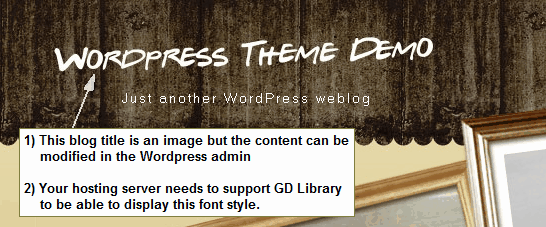
Can I change the blog title in the WordPress admin?
Definitely! In the WordPress admin, follow this process: Setting -> General. Then key in your blog title in the “Blog Title” field.
What is the name of this font?
Gabriel Weiss’ Friends Font.
Can this font support non-english character?
No. This font only supports english characters and some symbols. For the full list of characters and symbols this font can show, go to Gabriel Weiss’ Friends font detail page.
Is this font copyrighted?
No. I use fonts from Dafont.com. The fonts presented on Dafont.com are their authors’ property, and are either freeware, shareware, demo versions or public domain.
Is it possible to change the font?
Yes! To change the font, follow this instruction for changing font type:
1) Name the font of your choice to gabrwffr.ttf
2) Open /images/ folder
3) Replace gabrwffr.ttf with the font of your choice.
To change the font style, open and edit this file: title-img.php
Find
imagettftext($im, ?size, ?degree, ?x-pos, ?y-pos, $white, $font, $text);
Then replace the following value with numbers:
?size = font size
?degree = tilt degree
?x-pos = x position from the left
?y-pos = y position from the top
The default value for the Photo Frame theme is:
imagettftext($im, 22, 2, 20, 70, $white, $font, $text)
What is the server requirement?
To make this work, your web server should have GD Library supported. GD is an open source code library for the dynamic creation of images by programmers. To check if your server supports this feature, follow this simple instruction:
- Download this GD testing file
- Unzip the file and upload it to your server
- Open the file in any browser
- If your server supports GD, all the items should display “Yes”
The server report for Templatelite can be seen here.
What if my web server doesn’t support GD Library?
The effect will not show up. Instead, the header title will show this default font: Arial, 32px
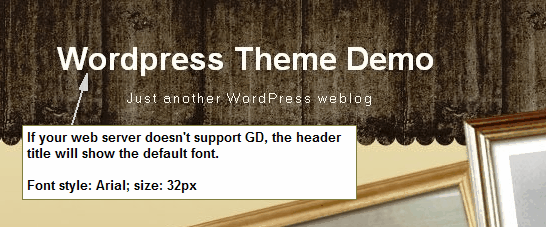
Themes that are currently using this effect:
– Photo Frame
23 Comments
Leave a Reply


The Header Title font is invisible? I can click it (it’s a link), but it’s not visible.
In the WordPress admin ->Setting -> General I can change the text “Just another WordPress weblog” but not the Special Font Title. So where do I change the Special Font?
If GD Library was nog supported I should see some tekst right?
Mike
Hi Mike, which version of WordPress are you using? This theme is designed for WordPress 2.5+
Yes. If your server does not support GD, you should see Arial font (32px) for the title.
Mike, this issue has been fixed. Please download version 1.02.
Kindly let me know if you have other problems.
Hi,
I downloaded again and only uploaded the new files you changed (date 17-9). Now it’s visible but only the standard font. My host supports GD because the image in the frame does rotate.
Mike
Mike, I forgot to add one more requirement for the special font. Your host need to support GD with FreeType enabled. It is most likely that your host support GD but FreeType is not enabled.
The image rotation does not need FreeType to make it work so you have no problem with that.
Is it possible to choose a different font for the website title? What other fonts could be chosen with the GD/FreeType library options?
Dear admin, how to know which version we are using ? I’ve downloaded from another website http://wordpress-tuto.fr/theme-wordpress-photo-frame-512#more-512 who made some translations in the theme.
I have the same issue as Mike (invisible title) and don’t know if it’s the same version or not 🙁
cEd
Dec, theme version can be found in style.css. The invisible title issue is already fixed with version 1.0.2. Please download the latest version from this site.
Solve myself the problem by replacing $font variable by the full path of the ttf file.
Thanks to create a so cool layout.
Regards
cEd
admin : I was using 1.0.2 translated. Don’t know if the error was there or not.
Steve, yes, it is possible to change the font style. Here’s the instruction:
1) Name the font of your choice to gabrwffr.ttf
2) Open /images/ folder
3) Replace gabrwffr.ttf with the font of your choice.
To change the font size and other info, edit this file: title-img.php
find
imagettftext($im, 22, 2, 20, 70, $white, $font, $text);
—————–
22 => font size
2 => degree
20 => x pos
70 => y pos
Thats was a really interesting post, i really like your blog I have added it to my favourites – keep up the good work!
This is so cool! With proper credit, may this be used to commercial purposes?
Very neat to see the special things you’ve developed. I especially like the image rotating/cropping thing too.
All the best,
Cathy
Cathy, yes. You could use our themes for commercial purposes.
Nice! I just put together a blog for some photos I’d like to share. This is a great theme! Thanks for putting it together and letting us use it.
Mike’s problem with the disappearing font might be related to this. I had to add a ./ in front of the font name to make sure it picked it up from the local directory.
Everything else is great!
Hi Mike,
I have version 1.05
My server doesn’t support the rotating image.
But I also see no text, only an invisible link.
Any suggestions for a workaround?
Thanks in advance
Bart
This is the CSS part:
#blogtitle {
position:absolute;
top:0px;
left:0px;
width:620px;
height:40px;
font-family: Verdana, Arial, Helvetica, Sans-Serif;
font-size:24px;
font-weight:bold;
text-align:left;
color:#fffffe;
overflow:hidden;
padding:40px 0px 0px 18px;
border:0px red solid;
background:url(‘images/title-img.php’) no-repeat left top;
}
This is the title-img.php I use:
Just forget to tell you that I use WP: 2.6.3
Ciao!
Bart
Bart, may I take a look at your site?
Hi Brian,
I just started tonight to redesign a (Dutch) static site into a blog with your great theme.
Currently I am editing some BG images, which are not finished,
but you can use one page to check (the rest is not working yet, no links are working).
I only changed the CSS, not any other files.
I prefer not to publish this URL yet (on your site) if possible.
Hi Brian,
I just downloaded version 1.06 (you never know), but still the title is not showing. Only an invisible link.
I also have deactivated some plugins in case they caused this, but no results.
The weird thing is that if I look at your site the working preview of this theme, http://demo.templatelite.com/index.php?wptheme=Photo+Frame I can see the title of this preview.
I hope you have a workaround for this, because I really love this theme!
Bart
Bart, another server requirement to display the special font successfully is that the server needs to support the Free Type. I guess your server doesn’t support this feature.
I see that you know a bit of graphic editing. Here is a quick way to display the title: use your image editing program and edit this image file “title_bg.jpg” found in the /images folder
The link to the home page will still be there because I use a transparent block to link the title to the home page.
Thanks Brian, that’s a smart tip you gave me!
Ciao!
Bart